Elasticipy.spherical_function
- class Elasticipy.spherical_function.HyperSphericalFunction(fun)[source]
Bases:
SphericalFunctionClass for defining functions that depend on two orthogonal directions u and v.
Create a hyperspherical function, that is, a function that depends on two orthogonal directions only.
- eval(u, *args)[source]
Evaluate the Hyperspherical function with respect to two orthogonal directions.
- Parameters:
u (list or np.ndarray) – First axis
args (list or np.ndarray) – Second axis
- Returns:
Function value
- Return type:
float or np.ndarray
See also
eval_sphericalevaluate the function along a direction defined by its spherical coordinates.
- eval_spherical(*args, degrees=False)[source]
Evaluate value along a given (set of) direction(s) defined by its (their) spherical coordinates.
- Parameters:
args (list or np.ndarray) –
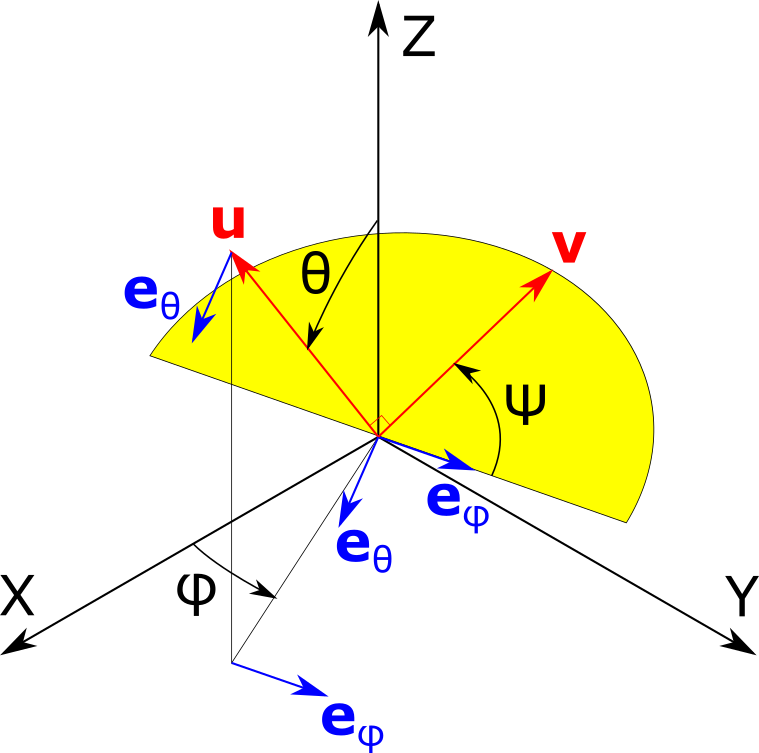
[phi, theta, psi] where phi denotes the azimuth angle from X axis to the first direction (u), theta is the latitude angle from Z axis (theta==0 -> u = Z axis), and psi is the angle defining the orientation of the second direction (v) in the plane orthogonal to u, as illustrated below:
- degreesbool, default False
If True, the angles are given in degrees instead of radians.
- Returns:
float or np.ndarray – If only one direction is given as a tuple of floats [nx, ny, nz], the result is a float;
otherwise, the result is a nd.array.
See also
evalevaluate the function along two orthogonal directions (u,v))
- evaluate_on_spherical_grid(n, return_in_spherical=True, use_symmetry=True)[source]
Create a set of vectors corresponding to a spherical grid (phi,theta), then flatten it.
- Parameters:
n (int or tuple of int) – If int, gives the overall number of evaluations over the unit hypersphere. If a tuple is passed, they gieve the number of angles to consider for (hyper)spherical coordinates (n_phi, n_theta, n_psi).
return_in_spherical (bool, optional) – If true, the first output argument will be the spherical coordinates (phi, theta). Otherwise, the cartersian coordinates are returned
use_symmetry (bool, optional) – Whether to use take advantage ot symmetry
- Returns:
tuple – Coordinates of evaluation, either in spherical of cartesian coordinates
numpy.ndarray – Grid of evaluated values
- max()[source]
Find maximum value of the function.
- Returns:
min (float) – Maximum value
direction (np.ndarray) – direction along which the maximum value is reached
See also
minreturn the minimum value and the location where it is reached
- mean(method='trapezoid', n_evals=1000000, seed=None)[source]
Estimate the mean value along all directions in the 3D space.
- Parameters:
method (str {'exact', 'Monte Carlo', 'trapezoid'}, optional) – If ‘exact’, the full integration is performed over the unit sphere (see Notes). If ‘trapezoid’, the trapeze method is used to approximate the integral. If ‘Monte Carlo’, the function is evaluated along a finite set of random directions.
n_evals (int, optional) – If method==’Monte Carlo’ or ‘trapezoid’, sets the number of unit directions to use.
seed (int, default None) – Sets the seed for random sampling when using the Monte Carlo method. Useful when one wants to reproduce results.
- Returns:
Mean value
- Return type:
float
See also
stdStandard deviation of the spherical function over the unit sphere.
Notes
The full integration over the unit sphere, used if method==’exact’, takes advantage of numpy.integrate.dblquad. This algorithm is robust but usually slow. The Monte Carlo method can be 1000 times faster.
- min()[source]
Find minimum value of the function.
- Returns:
fmin (float) – Minimum value
dir (np.ndarray) – Direction along which the minimum value is reached
See also
maxreturn the maximum value and the location where it is reached
- plot3D(n_phi=50, n_theta=50, n_psi=50, which='mean', fig=None, **kwargs)[source]
Generate a 3D plot representing the evaluation of spherical harmonics.
This function evaluates a function over a grid defined by spherical coordinates (phi, theta, psi) and produces a 3D plot. It provides options to display the mean, standard deviation, minimum, or maximum of the evaluated values along the third angles (psi). The plot can be customized with additional keyword arguments.
- Parameters:
n_phi (int, optional) – Number of divisions along the phi axis, default is 50.
n_theta (int, optional) – Number of divisions along the theta axis, default is 50.
n_psi (int, optional) – Number of divisions along the psi axis, default is 50.
which (str, optional) – Determines which statistical measure to plot (‘mean’, ‘std’, ‘min’, ‘max’), default is ‘mean’.
fig (matplotlib.figure.Figure, optional) – Handle to existing figure object. Default is None. If provided, it disables showing the figure.
kwargs (dict, optional) – Additional keyword arguments to customize the plot.
- Returns:
A tuple containing the matplotlib figure and axes objects.
- Return type:
tuple
- plot_as_pole_figure(n_theta=50, n_phi=200, n_psi=50, which='mean', projection='lambert', fig=None, plot_type='imshow', show=True, title=None, subplot_args=(), subplot_kwargs=None, **kwargs)[source]
Generate a pole figure plot from spherical function evaluation.
This function evaluates a spherical function over specified ranges of angles (phi, theta, psi) and then generates a 2D pole figure plot using various statistical summaries of the data (mean, std, min, max). It also supports several types of plot visualizations such as ‘imshow’, ‘contourf’, and ‘contour’.
- Parameters:
n_theta (int, optional) – Number of sampling points for theta angle. Default is 50.
n_phi (int, optional) – Number of sampling points for phi angle. Default is 200.
n_psi (int, optional) – Number of sampling points for psi angle. Default is 50.
which (str, optional) – Specifies the type of statistical summary to use for plotting. Options include ‘mean’, ‘std’, ‘min’, ‘max’. Default is ‘mean’.
projection (str, optional) – Type of projection for the pole figure plot. Default is ‘lambert’.
fig (matplotlib.figure.Figure, optional) – Pre-existing figure to use for plotting. If None, a new figure is created. Default is None.
plot_type (str, optional) – Type of plot to generate. Can be ‘imshow’, ‘contourf’, or ‘contour’. Default is ‘imshow’.
show (bool, optional) – Set whether to show the plot or not. Default is True. This must be turned off when using multiple subplots.
subplot_args (tuple, optional) – Arguments to pass to the add_subplot() function. Default is None.
subplot_kwargs (dict, optional) – Keyword arguments to pass to the add_subplot() function. Default is None.
**kwargs (dict, optional) – Additional keyword arguments passed to the plotting functions.
- Returns:
fig (matplotlib.figure.Figure) – The figure object containing the plot.
ax (matplotlib.axes.Axes) – The axes object containing the plot.
- plot_xyz_sections(n_theta=500, n_psi=100, color_minmax='blue', alpha_minmax=0.2, color_mean='red', fig=None)[source]
Plots the XYZ sections using polar projections.
This function creates a figure with three subplots representing the XY, XZ, and YZ sections. It utilizes polar projections to plot the min, max, and mean values of the evaluated function over given theta and phi ranges.
- Parameters:
n_theta (int, optional) – Number of theta points to use in the grid (default is 500).
n_psi (int, optional) – Number of psi points to use in the grid (default is 100).
color_minmax (str, optional) – Color to use for plotting min and max values (default is ‘blue’).
alpha_minmax (float, optional) – Alpha transparency level to use for the min/max fill (default is 0.2).
color_mean (str, optional) – Color to use for plotting mean values (default is ‘red’).
fig (matplotlib.figure.Figure, optional) – Handle to existing figure object. Default is None. If provided, it disables showing the figure.
- Returns:
fig (matplotlib.figure.Figure) – The created figure.
axs (list of matplotlib.axes._subplots.PolarAxesSubplot) – List of polar axis subplots.
- std(**kwargs)[source]
Standard deviation of the function along all directions in the 3D space.
- Parameters:
**kwargs – These parameters will be passed to var() function
- Returns:
Standard deviation
- Return type:
float
See also
varvariance of the function
- var(method='trapezoid', n_evals=1000000, mean=None, seed=None)[source]
Estimate the variance along all directions in the 3D space
- Parameters:
method (str {'exact', 'Monte Carlo', 'trapezoid}, optional) – If ‘exact’, the full integration is performed over the unit sphere (see Notes). If ‘trapezoid’, the trapeze method is used to approximate the integral. If ‘Monte Carlo’, the function is evaluated along a finite set of random directions.
n_evals (int, optional) – If method==’Monte Carlo’ or ‘trapezoid’, sets the number of unit directions to use.
mean (float, optional) – If provided, skip estimation of mean value and use that provided instead (only used for exact and trapezoid methods)
seed (int, optional) – Sets the seed for random sampling when using the Monte Carlo method. Useful when one wants to reproduce results.
- Returns:
Variance of the function
- Return type:
float
See also
meanmean value of the function over the unit sphere.
Notes
The full integration over the unit sphere, used if method==’exact’, takes advantage of numpy.integrate.dblquad. This algorithm is robust but usually slow. The Monte Carlo method can be 1000 times faster.
- class Elasticipy.spherical_function.SphericalFunction(fun, symmetry=True)[source]
Bases:
objectClass for spherical functions, that is, functions that depend on directions in 3D space.
Attribute
fun : function to use
Create a spherical function, that is, a function that depends on one direction only.
- param fun:
Function to return
- type fun:
callable
- param symmetry:
Set to true if fun(u)==fun(-u)
- type symmetry:
bool, optional
- eval(u)[source]
Evaluate value along a given (set of) direction(s).
- Parameters:
u (np.ndarray or list) – Direction(s) to estimate the value along with. It can be of a unique direction [nx, ny, nz], or a set of directions (e.g. [[n1x, n1y n1z],[n2x, n2y, n2z],…]).
- Returns:
If only one direction is given as a tuple of floats [nx, ny, nz], the result is a float; otherwise, the result is a nd.array.
- Return type:
float or np.ndarray
See also
eval_sphericalevaluate the function along a given direction given using the spherical coordinates
Examples
As an example of spherical function, we consider the Young modulus estimated from a stiffness tensor:
>>> from Elasticipy.tensors.elasticity import StiffnessTensor
>>> E = StiffnessTensor.cubic(C11=110, C12=54, C44=60).Young_modulus
The Young modulus along x direction is:
>>> E.eval([1,0,0])
74.4390243902439
The Young moduli along a set a directions can be evaluated at once. E.g. along x, y and z:
>>> E.eval([[1,0,0], [0,1,0], [0,0,1]])
array([74.43902439, 74.43902439, 74.43902439])
- eval_spherical(*args, degrees=False)[source]
Evaluate value along a given (set of) direction(s) defined by its (their) spherical coordinates.
- Parameters:
args (list or np.ndarray) – [phi, theta] where phi denotes the azimuth angle from X axis, and theta is the latitude angle from Z axis (theta==0 -> Z axis).
degrees (bool, default False) – If True, the angles are given in degrees instead of radians.
- Returns:
If only one direction is given as a tuple of floats [phi, theta], the result is a float; otherwise, the result is a nd.array.
- Return type:
float or np.ndarray
See also
evalevaluate the function along a direction given by its cartesian
Examples
>>> from Elasticipy.tensors.elasticity import StiffnessTensor
>>> E = StiffnessTensor.cubic(C11=110, C12=54, C44=60).Young_modulus
In spherical coordinates, the x direction is defined by theta=90° and phi=0. Therefore, the Young modulus along x direction is:
>>> E.eval_spherical([0, 90], degrees=True)
74.4390243902439
- evaluate_on_spherical_grid(n, return_in_spherical=True, use_symmetry=True)[source]
Create a set of vectors corresponding to a spherical grid (phi,theta), then flatten it.
- Parameters:
n (int or tuple of int) – If int, it give the overall number of evaluations over the quarter unit sphere. If tuple of int, they correspond to the number of spherical angles (n_phi, n_theta).
return_in_spherical (bool, optional) – If true, the first output argument will be the spherical coordinates (phi, theta). Otherwise, the cartesian coordinates are returned
use_symmetry (whether to take consider the upper half-domain only, or the full sphere.)
- Returns:
numpy.ndarray or tuple – Coordinates of evaluation. If return_in_spherical==True, they will be returned as a tuple of angle (phi, theta). Otherwise, they will be returned as a numpy array of shape (n_phi, n_theta, 3).
numpy.ndarray – Grid of evaluated values of shape (n_phi, n_theta, 3).
- max()[source]
Find maximum value of the function.
- Returns:
min (float) – Maximum value
direction (np.ndarray) – direction along which the maximum value is reached
See also
minreturn the minimum value and the location where it is reached
- mean(method='trapezoid', n_evals=10000, seed=None)[source]
Estimate the mean value along all directions in the 3D space.
- Parameters:
method (str {'exact', 'Monte Carlo', 'trapezoid'}, optional) – If ‘exact’, the full integration is performed over the unit sphere (see Notes). If ‘trapezoid’, the trapeze method is used to approximate the integral. If ‘Monte Carlo’, the function is evaluated along a finite set of random directions.
n_evals (int, optional) – If method==’Monte Carlo’ or ‘trapezoid’, sets the number of unit directions to use.
seed (int, default None) – Sets the seed for random sampling when using the Monte Carlo method. Useful when one wants to reproduce results.
- Returns:
Mean value
- Return type:
float
See also
stdStandard deviation of the spherical function over the unit sphere.
Notes
The full integration over the unit sphere, used if method==’exact’, takes advantage of numpy.integrate.dblquad. This algorithm is robust but usually slow. The Monte Carlo method can be 1000 times faster.
- min()[source]
Find minimum value of the function.
- Returns:
fmin (float) – Minimum value
dir (np.ndarray) – Direction along which the minimum value is reached
See also
maxreturn the maximum value and the location where it is reached
- plot3D(n_phi=50, n_theta=50, fig=None, **kwargs)[source]
3D plotting of a spherical function
- Parameters:
n_phi (int, default 50) – Number of azimuth angles (phi) to use for plotting. Default is 50.
n_theta (int, default 50) – Number of latitude angles (theta) to use for plotting. Default is 50.
fig (matplotlib.figure.Figure, default None) – handle to existing figure object. If None, a new figure will be created. If passed, the figure is not shown, (one should use plt.show() afterward).
**kwargs – These parameters will be passed to matplotlib plot_surface() function.
- Returns:
matplotlib.figure.Figure – Handle to the figure
matplotlib.Axes3D – Handle to axes
See also
plot_xyz_sectionsplot values of the function in X-Y, X-Z an Y-Z planes.
- plot_as_pole_figure(n_theta=50, n_phi=200, projection='lambert', fig=None, plot_type='imshow', title=None, subplot_args=(), subplot_kwargs=None, **kwargs)[source]
Plots a pole figure visualization of spherical data using specified parameters and plot types.
The function creates a pole figure based on spherical coordinates and can use different types of plots including ‘imshow’, ‘contourf’, and ‘contour’. It also supports a variety of projections and renders the figure using Matplotlib.
- Parameters:
n_theta (int, optional) – Number of divisions in the theta dimension, by default 50.
n_phi (int, optional) – Number of divisions in the phi dimension, by default 200.
projection (str {'Lambert','equal area'}, optional) – The type of projection to use for the plot, by default ‘Lambert’.
fig (matplotlib.figure.Figure, optional) – A Matplotlib figure object. If None, a new figure will be created, by default None.
plot_type (str, optional) – The type of plot to generate: ‘imshow’, ‘contourf’, or ‘contour’, by default ‘imshow’.
title (str, optional) – Title to add to the current axis. Default is None.
subplot_args (tuple) – List of arguments to pass to the subplot function, by default ()
subplot_kwargs (dict) – Dictionary of keyword-arguments to pass to the subplot function, by default {}
**kwargs (dict) – Additional keyword arguments to pass to the plotting functions.
- Returns:
fig (matplotlib.figure.Figure) – The Matplotlib figure containing the plot.
ax (matplotlib.axes._axes.Axes) – The Matplotlib axes of the plot.
- plot_xyz_sections(n_theta=500, fig=None, axs=None, **kwargs)[source]
Plot XYZ sections of spherical data.
This method generates a figure with three polar plots showing the XY, XZ, and YZ sections of the spherical data contained within the instance. Each section is plotted using n_theta evenly spaced points over the interval [0, 2π].
- Parameters:
n_theta (int, optional) – Number of points to use for the polar plot angles. Default is 500.
fig (matplotlib.figure.Figure, default None) – Handle to existing figure object. If None, a new figure will be created. If passed, the figure is not shown
axs (tuple of matplotlib.projections.polar.PolarAxes, optional) – If provided, use these axes to plot the sections, instead of creating new ones.
**kwargs (dict, optional) – Additional keyword arguments to pass to the plot function.
- Returns:
fig (matplotlib.figure.Figure) – The figure object containing the polar plots.
axs (list of matplotlib.axes._subplots.PolarAxesSubplot) – List of axes objects for each plot.
- std(**kwargs)[source]
Standard deviation of the function along all directions in the 3D space.
- Parameters:
**kwargs – These parameters will be passed to var() function
- Returns:
Standard deviation
- Return type:
float
See also
varvariance of the function
- var(method='trapezoid', n_evals=10000, mean=None, seed=None)[source]
Estimate the variance along all directions in the 3D space
- Parameters:
method (str {'exact', 'Monte Carlo', 'trapezoid}, optional) – If ‘exact’, the full integration is performed over the unit sphere (see Notes). If ‘trapezoid’, the trapeze method is used to approximate the integral. If ‘Monte Carlo’, the function is evaluated along a finite set of random directions.
n_evals (int, optional) – If method==’Monte Carlo’ or ‘trapezoid’, sets the number of unit directions to use.
mean (float, optional) – If provided, skip estimation of mean value and use that provided instead (only used for exact and trapezoid methods)
seed (int, optional) – Sets the seed for random sampling when using the Monte Carlo method. Useful when one wants to reproduce results.
- Returns:
Variance of the function
- Return type:
float
See also
meanmean value of the function over the unit sphere.
Notes
The full integration over the unit sphere, used if method==’exact’, takes advantage of numpy.integrate.dblquad. This algorithm is robust but usually slow. The Monte Carlo method can be 1000 times faster.
- Elasticipy.spherical_function.sph2cart(*args)[source]
Converts spherical/hyperspherical coordinates to cartesian coordinates.
- Parameters:
args (tuple) – (phi, theta) angles for spherical coordinates of direction u, where phi denotes the azimuth from X and theta is the colatitude angle from Z. If a third argument is passed, it defines the third angle in hyperspherical coordinate system (psi), that is the orientation of the second vector v, orthogonal to u.
- Returns:
numpy.ndarray – directions u expressed in cartesian coordinates system.
tuple of numpy.ndarray, numpy.ndarray – If a third angle is passed, returns a tuple: - The first element is u, the directions expressed in the cartesian coordinate system. - The second element is v, the direction of the second vector orthogonal to u, also expressed in the cartesian coordinate system.
- Elasticipy.spherical_function.uniform_spherical_distribution(n_evals, seed=None, return_orthogonal=False)[source]
Create a set of vectors whose projections over the unit sphere are uniformly distributed.
- Parameters:
n_evals (int) – Number of vectors to generate
seed (int, default None) – Sets the seed for the random values. Useful if one wants to ensure reproducibility.
return_orthogonal (bool, default False) – If true, also return a second set of vectors which are orthogonal to the first one.
- Returns:
u (np.ndarray) – Random set of vectors whose projections over the unit sphere are uniform.
v (np.ndarray) – Set of vectors with the same properties as u, but orthogonal to u. Returned only if return_orthogonal is True
Notes
- The returned vector(s) are not unit. If needed, one can use:
u = (u.T / np.linalg.norm(u, axis=1)).T