Elasticipy.tensors.stress_strain
- class elasticipy.tensors.stress_strain.StrainRateTensor(mat, force_symmetry=False)[source]
Bases:
StrainTensorClass for manipulating strain rate tensors, or arrays of strain rate tensors.
Create a symmetric second-order tensor
- Parameters:
mat (list or numpy.ndarray) – matrix or array to construct the symmetric tensor. It must be symmetric with respect to the two last indices (mat[…,i,j]=mat[…,j,i]), or composed of slices of upper-diagonal matrices (mat[i,j]=0 for each i>j).
force_symmetry (bool, optional) – If true, the symmetric part of the matrix will be used. It is mainly meant for debugging purpose.
Examples
We can create a symmetric tensor by privoding the full matrix, as long it is symmetric:
>>> from elasticipy.tensors.second_order import SymmetricSecondOrderTensor
>>> a = SymmetricSecondOrderTensor([[11, 12, 13],[12, 22, 23],[13, 23, 33]])
>>> print(a)
Symmetric second-order tensor
[[11. 12. 13.]
 [12. 22. 23.]
 [13. 23. 33.]]
Alternatively, we can pass the upper-diagonal part only:
>>> b = SymmetricSecondOrderTensor([[11, 12, 13],[0, 22, 23],[0, 0, 33]])
and check that a==b:
>>> print(a==b)
True
- property C[source]
Return tensor components
For instance T.C[i,j] returns all the (i,j)-th components of each tensor in the array.
- Returns:
Tensor components
- Return type:
np.ndarray
- property I1[source]
First invariant of the tensor (trace)
- Returns:
First invariant(s) of the tensor(s)
- Return type:
np.ndarray or float
- property I2[source]
Second invariant of the tensor
For a matrix M, it is defined as:
I_2 = 0.5 * ( np.trace(M)**2 + np.trace(np.matmul(M, M.T)) )
- Returns:
Second invariant(s) of the tensor(s)
- Return type:
np.array or float
- property I3[source]
Third invariant of the tensor (determinant)
- Returns:
Third invariant(s) of the tensor(s)
- Return type:
np.array or float
- property J1[source]
First invariant of the deviatoric part of the stress tensor. It is always zeros, as the deviatoric part as null trace.
- Returns:
zero(s)
- Return type:
float or np.ndarray
- property J2[source]
Second invariant of the deviatoric part of the tensor.
- Returns:
J2 invariant
- Return type:
float or np.ndarray
- property J3[source]
Third invariant of the deviatoric part of the tensor.
- Returns:
J3 invariant
- Return type:
float or np.ndarray
- Lode_angle(degrees=False)[source]
Computes the Lode angle of the tensor.
The returned value is defined from the positive cosine (see Notes).
- Parameters:
degrees (bool, optional) – Whether to return the angle in degrees or not
- Return type:
float or numpy.ndarray
Notes
The Lode angle is defined such that:
\[\cos(3\theta)= \frac{J_3}{2}\left(\frac{3}{J_2}\right)^{3/2}\]
- property T[source]
Transpose the array of tensors.
It is actually an alias for transpose_array()
- Returns:
Transposed array
- Return type:
- ddot(other, mode='pair')[source]
Double dot product (contraction of tensor product, usually denoted “:”) of two tensors.
For two tensors whose matrices are M1 and M2:
M1.ddot(M2) == np.trace(np.matmul(M1, M2))
- Parameters:
other (SecondOrderTensor or np.ndarray) – Tensor or tensor array to multiply by before contraction.
mode (str, optional) – If “pair”, the dot products are performed element-wise before contraction. Broadcasting rule applies. If “cross”, all the cross-combinations are computed, increasing the dimensionality. If
C=A.ddot(B, mode='cross'), thenC.shape = A.shape + B.shape.
- Returns:
Result of double dot product
- Return type:
float or np.ndarray
See also
dotcontraction product (“dot product”) between tensor.
- deviatoric_part()[source]
Deviatoric part of the tensor
- Return type:
self
See also
sphericalPartspherical part of the tensor
- div(axes=None, spacing=1.0)[source]
Compute the divergence vector of the tensor array, along given axes.
If the tensor has n dimensions, the divergence vector will be computed along its m first axes, with m = min(n, 3), except if specified in the
axesparameter (see below).- Parameters:
axes (list of int, tuple of int, int or None, default None) – Indices of axes along which to compute the divergence vector. If None (default), the m first axes of the array will be used to compute the derivatives.
spacing (float or np.ndarray or list, default 1.) – Spacing between samples the in each direction. If a scalar value is provided, the spacing is assumed equal in each direction. If an array or a list is provided, spacing[i] must return the spacing along the i-th axis (spacing[i] can be float or np.ndarray).
- Returns:
Divergence vector of the tensor array. If the tensor array is of shape (m,n,…,q), the divergence vector will be of shape (m,n,…,q,3).
- Return type:
np.ndarray
Notes
The divergence of a tensor field \(\mathbf{t}(\mathbf{x})\) is defined as:
\[[\nabla\cdot\mathbf{t}]_i = \frac{\partial t_{ij}}{\partial x_j}\]The main application of this operator is for balance of linear momentum of stress tensor:
\[\rho \mathbf{\gamma} = \nabla\cdot\mathbf{\sigma} + \rho\mathbf{b}\]where \(\mathbf{\sigma}\) is the stress tensor, \(\mathbf{\gamma}\) is the acceleration, \(\mathbf{b}\) is the body force density and \(\rho\) is the mass density.
In this function, the derivatives are computed with
numpy.gradfunction.Examples
First, we build an array of tensile stress with evenly spaced magnitude:
>>> from elasticipy.tensors.stress_strain import StressTensor
>>> magnitude = [0,1,2,3,4]
>>> s = StressTensor.tensile([1,0,0],magnitude)
>>> s.div()
array([[1., 0., 0.],
       [1., 0., 0.],
       [1., 0., 0.],
       [1., 0., 0.],
       [1., 0., 0.]])
We now create a stress tensor whose components follows this:
\[\sigma_{xx} = 2x+3y^2 \sigma_{yy} = y^2+z \sigma_{xy} = xy\]To do this, we consider a regular grid of 0.1 in a unit cube:
>>> import numpy as np
>>> spacing = 0.1
>>> x,y,z=np.meshgrid(np.arange(0,1,spacing),np.arange(0,1,spacing),np.arange(0,1,spacing), indexing='ij')
>>> s_xx = 2*x + 3*y**2
>>> s_yy = y**2+z
>>> s_xy = x*y
>>> s = StressTensor.tensile([1,0,0],s_xx) + StressTensor.tensile([0,1,0],s_yy) + StressTensor.shear([1,0,0],[0,1,0],s_xy)
>>> div = s.div(spacing = 0.1)
As we work here in 3D, the result is of shape (10,10,10,3):
>>> div.shape
(10, 10, 10, 3)
For instance, the divergence at x=y=z=0 is:
>>> div[0,0,0,:]
array([2. , 0.1, 0. ])
- dot(other, mode='pair')[source]
Perform contraction product (“dot product”) between tensor.
On tensor arrays, the product contraction can be performed element-wise, or considering all cross-combinations (see below).
- Parameters:
other (SecondOrderTensor) – tensor or tensor array to compute the product from
mode (str, optional) – If ‘pair’ (default), the contraction products of tensor arrays are applied element-wise. Broadcasting rule applies. If ‘cross’, all combinations of contraction product are considered. If
C=A.dot(B,mode='cross'), thenC.shape==A.shape + B.shape.
- Return type:
Examples
>>> from elasticipy.tensors.second_order import SecondOrderTensor
>>> A=SecondOrderTensor.rand(10)
>>> B=SecondOrderTensor.rand(10)
>>> AB_pair = A.dot(B)
>>> AB_pair.shape
(10,)
>>> AB_cross = A.dot(B, mode='cross')
>>> AB_cross.shape
(10, 10)
We can for instance check that:
>>> print(AB_pair[5] == A[5].dot(B[5]))
True
and:
>>> print(AB_cross[0,1] == A[0].dot(B[1]))
True
See also
ddotDouble-contraction product
- draw_Mohr_circles()[source]
Draw the Mohr circles of the symmetric second-order tensor
Given a tensor, the Mohr circles are meant to visually illustrate the possible shear components one can find when randomly rotating the tensor. See here for details.
- Returns:
fig (matplotlib.figure.Figure) – The Matplotlib figure containing the plot.
ax (matplotlib.axes._axes.Axes) – The Matplotlib axes of the plot.
- eig()[source]
Compute the principal values (eigenvalues) and principal direction (eigenvectors) of the tensor, sorted in descending order of principal values
- Returns:
numpy.ndarray – Principal values
numpy.ndarray – Principal directions
See also
eigvalscompute the principal values only
- eigvals()[source]
Compute the principal values (eigenvalues), sorted in descending order.
- Returns:
Principal values
- Return type:
numpy.ndarray
See also
eigreturn the principal values and principal directions
- elastic_energy(stress, mode='pair')[source]
Compute the elastic energy.
- Parameters:
stress (StressTensor) – Corresponding stress tensor
mode (str, optional) – If ‘pair’ (default), the elastic energies are computed element-wise. Broadcasting rule applies. If ‘cross’, each cross-combination of stress and strain are considered.
- Returns:
Volumetric elastic energy
- Return type:
float or numpy.ndarray
Examples
Let consider an isotropic material (e.g. steel), undergoing tensile strain. In order to compute the volumetric elastic energy, one can do the following:
>>> from elasticipy.tensors.stress_strain import StrainTensor
>>> from elasticipy.tensors.elasticity import StiffnessTensor
>>> C = StiffnessTensor.isotropic(E=210e3, nu=0.28)
>>> eps = StrainTensor.tensile([1,0,0],1e-3) # Define the strain
>>> sigma = C * eps # Compute the stress
>>> sigma
Stress tensor
[[268.46590909   0.           0.        ]
 [  0.         104.40340909   0.        ]
 [  0.           0.         104.40340909]]
Then, the volumetric elastic energy is:
>>> e = eps.elastic_energy(sigma)
>>> print(e)
0.13423295454545456
- eq_strain()[source]
von Mises equivalent strain
- Returns:
If the input tensor is single, the result will be float. Instead, an Numpy array will be returned.
- Return type:
numpy.ndarray or float
Notes
The von Mises equivalent strain is defined as:
\[\sqrt{\frac23 \varepsilon_{ij}\varepsilon_{ij}}\]Examples
>>> from elasticipy.tensors.stress_strain import StrainTensor
>>> eps_eq = StrainTensor.tensile([1,0,0], 1e-3).eq_strain()
>>> print(eps_eq)
0.000816496580927726
>>> eps_eq = StrainTensor.shear([1,0,0],[0,1,0], 1e-3).eq_strain()
>>> print(eps_eq)
0.0011547005383792514
- classmethod eye(shape=())[source]
Create an array of tensors populated with identity matrices
- Parameters:
shape (tuple or int, default ()) – If not provided, it just creates a single identity tensor. Otherwise, the tensor array will be of the specified shape.
- Returns:
Array of identity tensors
- Return type:
cls
- flatten()[source]
Flatten the array of tensors.
If T is of shape [s1, s2, …, sn], the shape for T.flatten() is [s1*s2*…*sn].
- Returns:
Flattened array (vector) of tensor
- Return type:
- classmethod from_Kelvin(array)[source]
Build a tensor from the Kelvin vector, or slices of Kelvin vectors
- Parameters:
array (np.ndarray or list) – Vectors, or slices of vectors, consisting in components following the Kelvin convention
- Return type:
See also
from_Voigtconstruct a tensor from vector(s) following the Voigt notation
to_Kelvinconvert the tensor to vector(s) following the Kelvin convention
- classmethod from_Voigt(array, voigt_map=None)[source]
Construct a SymmetricSecondOrderTensor from a Voigt vector, or slices of Voigt vectors.
If the array is of shape (6,), a single tensor is returned. If the array is of shape (m,n,o,…,6), the tensor will be of shape (m,n,o,…).
- Parameters:
array (np.ndarray or list) – array to build the SymmetricSecondOrderTensor from. We must have array.ndim>0 and array.shape[-1]==6.
voigt_map (list or tuple, optional) – 6-lenght list of factors to use for mapping. If None (default), the default Voigt map of the constructor is used.
- Return type:
See also
from_KelvinConstruct a tensor from vector(s) following the Kelvin notation
Examples
>>> from elasticipy.tensors.second_order import SymmetricSecondOrderTensor
>>> SymmetricSecondOrderTensor.from_Voigt([11, 22, 33, 23, 13, 12])
Symmetric second-order tensor
[[11. 12. 13.]
 [12. 22. 23.]
 [13. 23. 33.]]
- classmethod load_from_npy(file, **kwargs)[source]
Load a tensor array for .npy file.
This function uses numpy.load()
- Parameters:
file (file, str or pathlib.Path) – File to read to create the array
kwargs (dict) – Keyword arguments passed to numpy.load()
- Returns:
Tensor array
- Return type:
See also
savesave the tensor array as a numpy file
- classmethod load_from_txt(file, name_prefix='E', **kwargs)[source]
Load a tensor array from text file.
- Parameters:
file (str or file) – Textfile to read the components from.
name_prefix (str, optional) – Prefix to add to each column when parsing the file. For instance, with name_prefix=’E’, the function will look for columns names E11, E12, E13 etc.
- Returns:
Flat (1D) tensor constructed from the values given in the text file
- Return type:
- matmul(other)[source]
Perform matrix-like product between tensor arrays. Each “product” is a matrix product between the tensor components.
If A.shape=(a1, a2, …, an) and B.shape=(b1, b2, …, bn), with C=A.matmul(B), we have:
C.shape = (a1, a2, ..., an, b1, b2, ..., bn)
and:
C[i,j,k,...,p,q,r...] = np.matmul(A[i,j,k,...], B[p,q,r,...])
- Parameters:
other (SecondOrderTensor or np.ndarray or Rotation) – Tensor array or rotation to right-multiply by. If Rotation is provided, the rotations are applied on each tensor.
- Returns:
Tensor array
- Return type:
See also
__mul__Element-wise matrix product
- max(axis=None)[source]
Maximum value
- Parameters:
axis (int or None, default None) – Axis to compute maximum along with. If None, returns the overall maximum (max of flattened array)
- Returns:
Maximum value of tensors
- Return type:
- mean(axis=None)[source]
Arithmetic mean value
- Parameters:
axis (int or None, default None) – Axis to compute the mean along with. If None, returns the overall mean (mean of flattened array)
- Returns:
Mean tensor
- Return type:
- min(axis=None)[source]
Minimum value
- Parameters:
axis (int or None, default None) – Axis to compute minimum along with. If None, returns the overall minimum (min of flattened array)
- Returns:
Minimum value of tensors
- Return type:
- property ndim[source]
Return the number of dimensions of the tensor array
- Returns:
number of dimensions
- Return type:
int
See also
shapeshape of tensor array
- classmethod ones(shape=())[source]
Create an array of tensors populated with matrices of full of ones.
- Parameters:
shape (tuple or int, default ()) – If not provided, it just creates a single tensor of ones. Otherwise, the tensor array will be of the specified shape.
- Returns:
Array of ones tensors
- Return type:
cls
- principal_directions()[source]
Principal directions of the tensors
- Returns:
Principal directions of each tensor of the tensor array
- Return type:
np.ndarray
See also
eigReturn both eigenvalues and corresponding principal directions
- principal_strains()[source]
Values of the principals strains.
If the tensor array is of shape [m,n,…], the results will be of shape [m,n,…,3].
- Returns:
Principal strain values
- Return type:
np.ndarray
Examples
For a single strain value, the principal strain values are composed of 3 float. E.g.:
>>> from elasticipy.tensors.stress_strain import StrainTensor
>>> eps = StrainTensor.shear([1,0,0],[0,1,0],1e-3)
>>> eps.principal_strains()
array([ 0.001,  0.   , -0.001])
For strain tensor array, the shape of the returned array will depend on that of the strain array. E.g.:
>>> tau = [1,2,3,4] # increasing magnitude
>>> eps_2d = StrainTensor.shear([1,0,0],[0,1,0],tau)/1000
>>> eps_2d.principal_strains()
array([[ 0.001,  0.   , -0.001],
       [ 0.002,  0.   , -0.002],
       [ 0.003,  0.   , -0.003],
       [ 0.004,  0.   , -0.004]])
- classmethod rand(shape=None, seed=None)[source]
Generate a tensor array, populated with random uniform values in [0,1).
- Parameters:
shape (int or tuple, optional) – Shape of the tensor array. If not provided, a single tensor is returned
seed (int, optional) – Sets the seed for random generation. Useful to ensure reproducibility
- Returns:
Tensor or tensor array of uniform random value
- Return type:
cls
See also
randnGenerate a random sample of tensors whose components follows a normal distribution
Examples
Generate a single random tensor:
>>> from elasticipy.tensors.second_order import SecondOrderTensor as tensor
>>> tensor.rand(seed=123)
Second-order tensor
[[0.68235186 0.05382102 0.22035987]
 [0.18437181 0.1759059  0.81209451]
 [0.923345   0.2765744  0.81975456]]
Now try with tensor array: >>> t = tensor.rand(shape=(100,50)) >>> t.shape (100,50)
- classmethod randn(mean=array([[0., 0., 0.], [0., 0., 0.], [0., 0., 0.]]), std=array([[1., 1., 1.], [1., 1., 1.], [1., 1., 1.]]), shape=None, seed=None)[source]
Generate a tensor array, populated with components follow a normal distribution.
- Parameters:
mean (list of numpy.ndarray, optional) – (3,3) matrix providing the mean values of the components.
std (list of numpy.ndarray, optional) – (3,3) matrix providing the standard deviations of the components.
shape (tuple, optional) – Shape of the tensor array
seed (int, optional) – Sets the seed for random generation. Useful to ensure reproducibility
- Returns:
Tensor or tensor array of normal random value
- Return type:
cls
- reshape(shape, **kwargs)[source]
Reshape the array of tensors
- Parameters:
shape (tuple) – New shape of the array
kwargs (dict) – Keyword arguments passed to numpy.reshape()
- Returns:
Reshaped array
- Return type:
See also
flattenflatten an array to 1D
- rotate(rotation, mode='pair')[source]
Apply rotation(s) to the tensor(s).
The rotations can be applied element-wise, or on each cross-combination (see below).
- Parameters:
rotation (scipy.spatial.Rotation or orix.quaternion.Rotation)
mode (str, optional) – If ‘pair’, the rotations are applied element wise. Broadcasting rule applies. If ‘cross’, all the possible combinations are considered. If
C=A.rotate(rot), thenC.shape==A.shape + rot.shape.
- Return type:
- save(file, **kwargs)[source]
Save the tensor array as binary file (.npy format).
This function uses numpy.save function.
- Parameters:
file (file, str or pathlib.Path) – File or filename to which the tensor is saved.
kwargs (dict) – Keyword arguments passed to numpy.save()
See also
load_from_npyload a tensor array from a numpy file
- save_as_txt(file, name_prefix='E', **kwargs)[source]
Save the tensor array to human-readable text file.
The array must be 1D. The i-th row of the file will provide the components of the i-th tensor in of the array. This function uses pandas.DataFrame.to_csv().
- Parameters:
file (file or str) – File to dump tensor components to.
name_prefix (str, optional) – Prefix to add for naming the columns. For instance, name_prefix=’E’ will result in columns named E11, E12, E13 etc.
kwargs (dict) – Keyword arguments passed to pandas.DataFrame.to_csv()
See also
load_from_txtload a tensor array from a text file
Examples
Let’s start with a random tensor:
>>> from elasticipy.tensors.second_order import SecondOrderTensor
>>> t = SecondOrderTensor.rand(seed=123) # Use seed to ensure reproducibility
>>> t
Second-order tensor
[[0.68235186 0.05382102 0.22035987]
 [0.18437181 0.1759059  0.81209451]
 [0.923345   0.2765744  0.81975456]]
Then, this tensor can be saved to a text file:
>>> t.save_as_txt('random_tensor.txt')
The content of this file will look like this:
11,12,13,21,22,23,31,32,33
0.6823518632481435,0.053821018802222675,0.22035987277261138,0.1843718106986697,0.17590590108503035,0.8120945066557737,0.9233449980270564,0.27657439779710624,0.8197545615930021
Later, this file can be read with
load_from_txt:>>> t2 = SecondOrderTensor.load_from_txt('random_tensor.txt') >>> t2 Second-order tensor Shape=(1,)
One can note that the returned object is an array here (although
twas a single tensor). This is because the functions above are mainly meant to deal with tensor arrays. Still, we have:>>> t2[0] Second-order tensor [[0.68235186 0.05382102 0.22035987] [0.18437181 0.1759059 0.81209451] [0.923345 0.2765744 0.81975456]]
Now, let’s consider a random tensor array:
>>> t = SecondOrderTensor.rand(shape=(100,), seed=123)
Have a look on its first value:
>>> t[0] Second-order tensor [[0.68235186 0.05382102 0.22035987] [0.18437181 0.1759059 0.81209451] [0.923345 0.2765744 0.81975456]]
Now save the array:
>>> t.save_as_txt('random_tensor_array.txt')
and try to reload it:
>>> t2 = SecondOrderTensor.load_from_txt('random_tensor_array.txt')
One can check that the original shape has bee retreived:
>>> t2.shape (100,)
And that its value are almost the same of the original one (because of round off errors), e.g.:
>>> t2[0]
Second-order tensor
[[0.68235186 0.05382102 0.22035987]
 [0.18437181 0.1759059  0.81209451]
 [0.923345   0.2765744  0.81975456]]
By default, the columns in the text file are named 11, 12, etc. These names can be appended with a prefix:
>>> t.save_as_txt('random_tensor_array_with_prefix.txt', name_prefix='E')
In this case, the resulting text file will look like this:
E11,E12,E13,E21,E22,E23,E31,E32,E33 0.6823518632481435,0.053821018802222675,0.22035987277261138,0.1843718106986697,0.17590590108503035,0.8120945066557737,0.9233449980270564,0.27657439779710624,0.8197545615930021 0.8898926931111859,0.5129704552295319,0.24496460106879647,0.8242415960974113,0.21376296337509548,0.7414670522347097,0.6299402045896808,0.927407258525167,0.23190818860641882 0.7991251286200829,0.5181650368527142,0.23155562481706748,0.16590399324074456,0.49778896849779386,0.5827246406153199,0.18433798742847973,0.014894916760232246,0.47113322889046083 [...]
And it can still be parsed to rebuild the tensor:
>>> t3 = SecondOrderTensor.load_from_txt('random_tensor_array_with_prefix.txt', name_prefix='E')
One can check that all the values of
t2andt3are the same:>>> import numpy as np >>> np.all(t3 == t2) np.True_
- property shape[source]
Return the shape of the tensor array
- Returns:
Shape of array
- Return type:
tuple
See also
ndimnumber of dimensions
- classmethod shear(u, v, magnitude)[source]
Create an array of tensors corresponding to shear state along two orthogonal directions.
- Parameters:
u (np.ndarray or list) – First direction. Must be a 3D vector.
v (np.ndarray or list) – Second direction. Must be a 3D vector.
magnitude (float or np.ndarray or list) – Magnitude of the shear state to consider. If a list or an array is provided, the shape of the tensor array will be of the same shape as magnitude.
- Returns:
tensor or tensor array
- Return type:
cls
- spherical_part()[source]
Spherical (hydrostatic) part of the tensor
- Returns:
Spherical part
- Return type:
self
See also
I1compute the first invariant of the tensor
deviatoricPartdeviatoric the part of the tensor
- classmethod stack(arrays, axis=0)[source]
Stack tensor arrays along the specified axis.
- Parameters:
arrays (list of SecondOrderTensor or tuple of SecondOrderTensor) – List of tensor to stack together
axis (int, optional) – Axis along which to stack
- Returns:
Stacked tensor array
- Return type:
Examples
>>> from elasticipy.tensors.second_order import SecondOrderTensor >>> import numpy as np >>> a = SecondOrderTensor.rand(shape=3) >>> b = SecondOrderTensor.rand(shape=3) >>> c = SecondOrderTensor.stack((a, b)) >>> c.shape (2, 3) >>> np.all(c[0] == a) np.True_ >>> np.all(c[1] == b) np.True_
>>> a = SecondOrderTensor.rand(shape=(3, 4)) >>> b = SecondOrderTensor.rand(shape=(3, 4)) >>> c = SecondOrderTensor.stack((a, b), axis=1) >>> c.shape (3, 2, 4) >>> np.all(c[:,0,:] == a) np.True_ >>> np.all(c[:,1,:] == b) np.True_
- std(axis=None)[source]
Standard deviation
- Parameters:
axis (int or None, default None) – Axis to compute standard deviation along with. If None, returns the overall standard deviation (std of flattened array)
- Returns:
Tensor of standard deviation
- Return type:
- symmetric_part()[source]
Symmetric part of the tensor
- Returns:
Symmetric tensor
- Return type:
See also
skewPartSkew-symmetric part of the tensor
- classmethod tensile(u, magnitude)[source]
Create an array of tensors corresponding to tensile state along a given direction.
- Parameters:
u (np.ndarray or list) – Tensile direction. Must be a 3D vector.
magnitude (float or np.ndarray or list) – Magnitude of the tensile state to consider. If a list or an array is provided, the shape of the tensor array will be of the same shape as magnitude.
- Returns:
tensor or tensor array
- Return type:
cls
- to_Kelvin()[source]
Convert the tensor to vector, or slices of vector, following the Kelvin(-Mandel) convention.
- Return type:
numpy.ndarray
See also
from_KelvinConstruct a tensor from vector(s) following the Kelvin convention
to_VoigtConvert the tensor to vector(s) following the Voigt convention
- to_Voigt()[source]
Convert the tensor to vector, or slices of vector, following the Voigt convention.
If the tensor array has shape (m,n,…), the result will be of shape (m,n,…,6).
- Returns:
Voigt vector summarizing the components
- Return type:
numpy.ndarray
- to_pymatgen()[source]
Convert the second order object into an object compatible with pymatgen.
The object to use must be either a single tensor, or a flat tensor array. In the latter case, the output will be a list of pymatgen’s tensors.
- Returns:
- The type of output depends on the type of object to use:
if the object is of class StrainTensor, the output will be of class pymatgen.analysis.elasticity.Strain
if the object is of class StressTensor, the output will be of class pymatgen.analysis.elasticity.Stress
otherwise, the output will be of class pymatgen.core.tensors.Tensor
- Return type:
pymatgen.analysis.elasticity.Strain, pymatgen.analysis.elasticity.Stress, pymatgen.core.tensors.Tensor or list
See also
flattenConverts a tensor array to 1D tensor array
- trace()[source]
Return the traces of the tensor array
- Returns:
traces of each tensor of the tensor array
- Return type:
np.ndarray or float
- transpose_array()[source]
Transpose the array of tensors
If A is a tensor array of shape [s1, s2, …, sn], A.T is of shape [sn, …, s2, s1].
- Returns:
Transposed array
- Return type:
See also
Ttranspose the tensor array (not the components)
- transpose_tensor()[source]
Transpose of tensors of the tensor array
- Returns:
Array of transposed tensors of the tensor array
- Return type:
See also
transpose_arraytranspose the array (not the components)
- volumetric_strain()[source]
Volumetric change (1st invariant of the strain tensor)
- Returns:
Volumetric change
- Return type:
numpy.ndarray or float
Examples
At first, try with pure shear:
>>> from elasticipy.tensors.stress_strain import StrainTensor >>> eps = StrainTensor.shear([1,0,0],[0,1,0],1e-3) >>> print(eps.volumetric_strain()) 0.0
Now try with hydrastatic straining:
>>> import numpy as np >>> eps_hydro = StrainTensor(-np.eye(3)) / 1000 >>> eps_hydro Strain tensor [[-0.001 -0. -0. ] [-0. -0.001 -0. ] [-0. -0. -0.001]] >>> print(eps_hydro.volumetric_strain()) -0.003
- classmethod zeros(shape=())[source]
Create an array of tensors populated with matrices full of zeros.
- Parameters:
shape (tuple or int, default ()) – If not provided, it just creates a single tensor of ones. Otherwise, the tensor array will be of the specified shape.
- Returns:
Array of ones tensors
- Return type:
cls
- class elasticipy.tensors.stress_strain.StrainTensor(mat, force_symmetry=False)[source]
Bases:
SymmetricSecondOrderTensorClass for manipulating the symmetric part of gradient tensor (aka. strain tensor), or arrays of such tensors.
Create a symmetric second-order tensor
- Parameters:
mat (list or numpy.ndarray) – matrix or array to construct the symmetric tensor. It must be symmetric with respect to the two last indices (mat[…,i,j]=mat[…,j,i]), or composed of slices of upper-diagonal matrices (mat[i,j]=0 for each i>j).
force_symmetry (bool, optional) – If true, the symmetric part of the matrix will be used. It is mainly meant for debugging purpose.
Examples
We can create a symmetric tensor by privoding the full matrix, as long it is symmetric:
>>> from elasticipy.tensors.second_order import SymmetricSecondOrderTensor >>> a = SymmetricSecondOrderTensor([[11, 12, 13],[12, 22, 23],[13, 23, 33]]) >>> print(a) Symmetric second-order tensor [[11. 12. 13.] [12. 22. 23.] [13. 23. 33.]]
Alternatively, we can pass the upper-diagonal part only:
>>> b = SymmetricSecondOrderTensor([[11, 12, 13],[0, 22, 23],[0, 0, 33]])
and check that a==b:
>>> print(a==b) True
- property C[source]
Return tensor components
For instance T.C[i,j] returns all the (i,j)-th components of each tensor in the array.
- Returns:
Tensor components
- Return type:
np.ndarray
- property I1[source]
First invariant of the tensor (trace)
- Returns:
First invariant(s) of the tensor(s)
- Return type:
np.ndarray or float
- property I2[source]
Second invariant of the tensor
For a matrix M, it is defined as:
I_2 = 0.5 * ( np.trace(M)**2 + np.trace(np.matmul(M, M.T)) )
- Returns:
Second invariant(s) of the tensor(s)
- Return type:
np.array or float
- property I3[source]
Third invariant of the tensor (determinant)
- Returns:
Third invariant(s) of the tensor(s)
- Return type:
np.array or float
- property J1[source]
First invariant of the deviatoric part of the stress tensor. It is always zeros, as the deviatoric part as null trace.
- Returns:
zero(s)
- Return type:
float or np.ndarray
- property J2[source]
Second invariant of the deviatoric part of the tensor.
- Returns:
J2 invariant
- Return type:
float or np.ndarray
- property J3[source]
Third invariant of the deviatoric part of the tensor.
- Returns:
J3 invariant
- Return type:
float or np.ndarray
- Lode_angle(degrees=False)[source]
Computes the Lode angle of the tensor.
The returned value is defined from the positive cosine (see Notes).
- Parameters:
degrees (bool, optional) – Whether to return the angle in degrees or not
- Return type:
float or numpy.ndarray
Notes
The Lode angle is defined such that:
\[\cos(3\theta)= \frac{J_3}{2}\left(\frac{3}{J_2}\right)^{3/2}\]
- property T[source]
Transpose the array of tensors.
It is actually an alias for transpose_array()
- Returns:
Transposed array
- Return type:
- ddot(other, mode='pair')[source]
Double dot product (contraction of tensor product, usually denoted “:”) of two tensors.
For two tensors whose matrices are M1 and M2:
M1.ddot(M2) == np.trace(np.matmul(M1, M2))
- Parameters:
other (SecondOrderTensor or np.ndarray) – Tensor or tensor array to multiply by before contraction.
mode (str, optional) – If “pair”, the dot products are performed element-wise before contraction. Broadcasting rule applies. If “cross”, all the cross-combinations are computed, increasing the dimensionality. If
C=A.ddot(B, mode='cross'), thenC.shape = A.shape + B.shape.
- Returns:
Result of double dot product
- Return type:
float or np.ndarray
See also
dotcontraction product (“dot product”) between tensor.
- deviatoric_part()[source]
Deviatoric part of the tensor
- Return type:
self
See also
sphericalPartspherical part of the tensor
- div(axes=None, spacing=1.0)[source]
Compute the divergence vector of the tensor array, along given axes.
If the tensor has n dimensions, the divergence vector will be computed along its m first axes, with m = min(n, 3), except if specified in the
axesparameter (see below).- Parameters:
axes (list of int, tuple of int, int or None, default None) – Indices of axes along which to compute the divergence vector. If None (default), the m first axes of the array will be used to compute the derivatives.
spacing (float or np.ndarray or list, default 1.) – Spacing between samples the in each direction. If a scalar value is provided, the spacing is assumed equal in each direction. If an array or a list is provided, spacing[i] must return the spacing along the i-th axis (spacing[i] can be float or np.ndarray).
- Returns:
Divergence vector of the tensor array. If the tensor array is of shape (m,n,…,q), the divergence vector will be of shape (m,n,…,q,3).
- Return type:
np.ndarray
Notes
The divergence of a tensor field \(\mathbf{t}(\mathbf{x})\) is defined as:
\[[\nabla\cdot\mathbf{t}]_i = \frac{\partial t_{ij}}{\partial x_j}\]The main application of this operator is for balance of linear momentum of stress tensor:
\[\rho \mathbf{\gamma} = \nabla\cdot\mathbf{\sigma} + \rho\mathbf{b}\]where \(\mathbf{\sigma}\) is the stress tensor, \(\mathbf{\gamma}\) is the acceleration, \(\mathbf{b}\) is the body force density and \(\rho\) is the mass density.
In this function, the derivatives are computed with
numpy.gradfunction.Examples
First, we build an array of tensile stress with evenly spaced magnitude:
>>> from elasticipy.tensors.stress_strain import StressTensor >>> magnitude = [0,1,2,3,4] >>> s = StressTensor.tensile([1,0,0],magnitude) >>> s.div() array([[1., 0., 0.], [1., 0., 0.], [1., 0., 0.], [1., 0., 0.], [1., 0., 0.]])
We now create a stress tensor whose components follows this:
\[\sigma_{xx} = 2x+3y^2 \sigma_{yy} = y^2+z \sigma_{xy} = xy\]To do this, we consider a regular grid of 0.1 in a unit cube:
>>> import numpy as np >>> spacing = 0.1 >>> x,y,z=np.meshgrid(np.arange(0,1,spacing),np.arange(0,1,spacing),np.arange(0,1,spacing), indexing='ij') >>> s_xx = 2*x + 3*y**2 >>> s_yy = y**2+z >>> s_xy = x*y >>> s = StressTensor.tensile([1,0,0],s_xx) + StressTensor.tensile([0,1,0],s_yy) + StressTensor.shear([1,0,0],[0,1,0],s_xy) >>> div = s.div(spacing = 0.1)
As we work here in 3D, the result is of shape (10,10,10,3):
>>> div.shape (10, 10, 10, 3)
For instance, the divergence at x=y=z=0 is:
>>> div[0,0,0,:] array([2. , 0.1, 0. ])
- dot(other, mode='pair')[source]
Perform contraction product (“dot product”) between tensor.
On tensor arrays, the product contraction can be performed element-wise, or considering all cross-combinations (see below).
- Parameters:
other (SecondOrderTensor) – tensor or tensor array to compute the product from
mode (str, optional) – If ‘pair’ (default), the contraction products of tensor arrays are applied element-wise. Broadcasting rule applies. If ‘cross’, all combinations of contraction product are considered. If
C=A.dot(B,mode='cross'), thenC.shape==A.shape + B.shape.
- Return type:
Examples
>>> from elasticipy.tensors.second_order import SecondOrderTensor >>> A=SecondOrderTensor.rand(10) >>> B=SecondOrderTensor.rand(10) >>> AB_pair = A.dot(B) >>> AB_pair.shape (10,)
>>> AB_cross = A.dot(B, mode='cross') >>> AB_cross.shape (10, 10)
We can for instance check that:
>>> print(AB_pair[5] == A[5].dot(B[5])) True
and:
>>> print(AB_cross[0,1] == A[0].dot(B[1])) True
See also
ddotDouble-contraction product
- draw_Mohr_circles()[source]
Draw the Mohr circles of the symmetric second-order tensor
Given a tensor, the Mohr circles are meant to visually illustrate the possible shear components one can find when randomly rotating the tensor. See here for details.
- Returns:
fig (matplotlib.figure.Figure) – The Matplotlib figure containing the plot.
ax (matplotlib.axes._axes.Axes) – The Matplotlib axes of the plot.
- eig()[source]
Compute the principal values (eigenvalues) and principal direction (eigenvectors) of the tensor, sorted in descending order of principal values
- Returns:
numpy.ndarray – Principal values
numpy.ndarray – Principal directions
See also
eigvalscompute the principal values only
- eigvals()[source]
Compute the principal values (eigenvalues), sorted in descending order.
- Returns:
Principal values
- Return type:
numpy.ndarray
See also
eigreturn the principal values and principal directions
- elastic_energy(stress, mode='pair')[source]
Compute the elastic energy.
- Parameters:
stress (StressTensor) – Corresponding stress tensor
mode (str, optional) – If ‘pair’ (default), the elastic energies are computed element-wise. Broadcasting rule applies. If ‘cross’, each cross-combination of stress and strain are considered.
- Returns:
Volumetric elastic energy
- Return type:
float or numpy.ndarray
Examples
Let consider an isotropic material (e.g. steel), undergoing tensile strain. In order to compute the volumetric elastic energy, one can do the following:
>>> from elasticipy.tensors.stress_strain import StrainTensor >>> from elasticipy.tensors.elasticity import StiffnessTensor >>> C = StiffnessTensor.isotropic(E=210e3, nu=0.28) >>> eps = StrainTensor.tensile([1,0,0],1e-3) # Define the strain >>> sigma = C * eps # Compute the stress >>> sigma Stress tensor [[268.46590909 0. 0. ] [ 0. 104.40340909 0. ] [ 0. 0. 104.40340909]]
Then, the volumetric elastic energy is:
>>> e = eps.elastic_energy(sigma) >>> print(e) 0.13423295454545456
- eq_strain()[source]
von Mises equivalent strain
- Returns:
If the input tensor is single, the result will be float. Instead, an Numpy array will be returned.
- Return type:
numpy.ndarray or float
Notes
The von Mises equivalent strain is defined as:
\[\sqrt{\frac23 \varepsilon_{ij}\varepsilon_{ij}}\]Examples
>>> from elasticipy.tensors.stress_strain import StrainTensor >>> eps_eq = StrainTensor.tensile([1,0,0], 1e-3).eq_strain() >>> print(eps_eq) 0.000816496580927726 >>> eps_eq = StrainTensor.shear([1,0,0],[0,1,0], 1e-3).eq_strain() >>> print(eps_eq) 0.0011547005383792514
- classmethod eye(shape=())[source]
Create an array of tensors populated with identity matrices
- Parameters:
shape (tuple or int, default ()) – If not provided, it just creates a single identity tensor. Otherwise, the tensor array will be of the specified shape.
- Returns:
Array of identity tensors
- Return type:
cls
- flatten()[source]
Flatten the array of tensors.
If T is of shape [s1, s2, …, sn], the shape for T.flatten() is [s1*s2*…*sn].
- Returns:
Flattened array (vector) of tensor
- Return type:
- classmethod from_Kelvin(array)[source]
Build a tensor from the Kelvin vector, or slices of Kelvin vectors
- Parameters:
array (np.ndarray or list) – Vectors, or slices of vectors, consisting in components following the Kelvin convention
- Return type:
See also
from_Voigtconstruct a tensor from vector(s) following the Voigt notation
to_Kelvinconvert the tensor to vector(s) following the Kelvin convention
- classmethod from_Voigt(array, voigt_map=None)[source]
Construct a SymmetricSecondOrderTensor from a Voigt vector, or slices of Voigt vectors.
If the array is of shape (6,), a single tensor is returned. If the array is of shape (m,n,o,…,6), the tensor will be of shape (m,n,o,…).
- Parameters:
array (np.ndarray or list) – array to build the SymmetricSecondOrderTensor from. We must have array.ndim>0 and array.shape[-1]==6.
voigt_map (list or tuple, optional) – 6-lenght list of factors to use for mapping. If None (default), the default Voigt map of the constructor is used.
- Return type:
See also
from_KelvinConstruct a tensor from vector(s) following the Kelvin notation
Examples
>>> from elasticipy.tensors.second_order import SymmetricSecondOrderTensor >>> SymmetricSecondOrderTensor.from_Voigt([11, 22, 33, 23, 13, 12]) Symmetric second-order tensor [[11. 12. 13.] [12. 22. 23.] [13. 23. 33.]]
- classmethod load_from_npy(file, **kwargs)[source]
Load a tensor array for .npy file.
This function uses numpy.load()
- Parameters:
file (file, str or pathlib.Path) – File to read to create the array
kwargs (dict) – Keyword arguments passed to numpy.load()
- Returns:
Tensor array
- Return type:
See also
savesave the tensor array as a numpy file
- classmethod load_from_txt(file, name_prefix='E', **kwargs)[source]
Load a tensor array from text file.
- Parameters:
file (str or file) – Textfile to read the components from.
name_prefix (str, optional) – Prefix to add to each column when parsing the file. For instance, with name_prefix=’E’, the function will look for columns names E11, E12, E13 etc.
- Returns:
Flat (1D) tensor constructed from the values given in the text file
- Return type:
- matmul(other)[source]
Perform matrix-like product between tensor arrays. Each “product” is a matrix product between the tensor components.
If A.shape=(a1, a2, …, an) and B.shape=(b1, b2, …, bn), with C=A.matmul(B), we have:
C.shape = (a1, a2, ..., an, b1, b2, ..., bn)
and:
C[i,j,k,...,p,q,r...] = np.matmul(A[i,j,k,...], B[p,q,r,...])
- Parameters:
other (SecondOrderTensor or np.ndarray or Rotation) – Tensor array or rotation to right-multiply by. If Rotation is provided, the rotations are applied on each tensor.
- Returns:
Tensor array
- Return type:
See also
__mul__Element-wise matrix product
- max(axis=None)[source]
Maximum value
- Parameters:
axis (int or None, default None) – Axis to compute maximum along with. If None, returns the overall maximum (max of flattened array)
- Returns:
Maximum value of tensors
- Return type:
- mean(axis=None)[source]
Arithmetic mean value
- Parameters:
axis (int or None, default None) – Axis to compute the mean along with. If None, returns the overall mean (mean of flattened array)
- Returns:
Mean tensor
- Return type:
- min(axis=None)[source]
Minimum value
- Parameters:
axis (int or None, default None) – Axis to compute minimum along with. If None, returns the overall minimum (min of flattened array)
- Returns:
Minimum value of tensors
- Return type:
- property ndim[source]
Return the number of dimensions of the tensor array
- Returns:
number of dimensions
- Return type:
int
See also
shapeshape of tensor array
- classmethod ones(shape=())[source]
Create an array of tensors populated with matrices of full of ones.
- Parameters:
shape (tuple or int, default ()) – If not provided, it just creates a single tensor of ones. Otherwise, the tensor array will be of the specified shape.
- Returns:
Array of ones tensors
- Return type:
cls
- principal_directions()[source]
Principal directions of the tensors
- Returns:
Principal directions of each tensor of the tensor array
- Return type:
np.ndarray
See also
eigReturn both eigenvalues and corresponding principal directions
- principal_strains()[source]
Values of the principals strains.
If the tensor array is of shape [m,n,…], the results will be of shape [m,n,…,3].
- Returns:
Principal strain values
- Return type:
np.ndarray
Examples
For a single strain value, the principal strain values are composed of 3 float. E.g.:
>>> from elasticipy.tensors.stress_strain import StrainTensor >>> eps = StrainTensor.shear([1,0,0],[0,1,0],1e-3) >>> eps.principal_strains() array([ 0.001, 0. , -0.001])
For strain tensor array, the shape of the returned array will depend on that of the strain array. E.g.:
>>> tau = [1,2,3,4] # increasing magnitude >>> eps_2d = StrainTensor.shear([1,0,0],[0,1,0],tau)/1000 >>> eps_2d.principal_strains() array([[ 0.001, 0. , -0.001], [ 0.002, 0. , -0.002], [ 0.003, 0. , -0.003], [ 0.004, 0. , -0.004]])
- classmethod rand(shape=None, seed=None)[source]
Generate a tensor array, populated with random uniform values in [0,1).
- Parameters:
shape (int or tuple, optional) – Shape of the tensor array. If not provided, a single tensor is returned
seed (int, optional) – Sets the seed for random generation. Useful to ensure reproducibility
- Returns:
Tensor or tensor array of uniform random value
- Return type:
cls
See also
randnGenerate a random sample of tensors whose components follows a normal distribution
Examples
Generate a single random tensor:
>>> from elasticipy.tensors.second_order import SecondOrderTensor as tensor >>> tensor.rand(seed=123) Second-order tensor [[0.68235186 0.05382102 0.22035987] [0.18437181 0.1759059 0.81209451] [0.923345 0.2765744 0.81975456]]
Now try with tensor array: >>> t = tensor.rand(shape=(100,50)) >>> t.shape (100,50)
- classmethod randn(mean=array([[0., 0., 0.], [0., 0., 0.], [0., 0., 0.]]), std=array([[1., 1., 1.], [1., 1., 1.], [1., 1., 1.]]), shape=None, seed=None)[source]
Generate a tensor array, populated with components follow a normal distribution.
- Parameters:
mean (list of numpy.ndarray, optional) – (3,3) matrix providing the mean values of the components.
std (list of numpy.ndarray, optional) – (3,3) matrix providing the standard deviations of the components.
shape (tuple, optional) – Shape of the tensor array
seed (int, optional) – Sets the seed for random generation. Useful to ensure reproducibility
- Returns:
Tensor or tensor array of normal random value
- Return type:
cls
- reshape(shape, **kwargs)[source]
Reshape the array of tensors
- Parameters:
shape (tuple) – New shape of the array
kwargs (dict) – Keyword arguments passed to numpy.reshape()
- Returns:
Reshaped array
- Return type:
See also
flattenflatten an array to 1D
- rotate(rotation, mode='pair')[source]
Apply rotation(s) to the tensor(s).
The rotations can be applied element-wise, or on each cross-combination (see below).
- Parameters:
rotation (scipy.spatial.Rotation or orix.quaternion.Rotation)
mode (str, optional) – If ‘pair’, the rotations are applied element wise. Broadcasting rule applies. If ‘cross’, all the possible combinations are considered. If
C=A.rotate(rot), thenC.shape==A.shape + rot.shape.
- Return type:
- save(file, **kwargs)[source]
Save the tensor array as binary file (.npy format).
This function uses numpy.save function.
- Parameters:
file (file, str or pathlib.Path) – File or filename to which the tensor is saved.
kwargs (dict) – Keyword arguments passed to numpy.save()
See also
load_from_npyload a tensor array from a numpy file
- save_as_txt(file, name_prefix='E', **kwargs)[source]
Save the tensor array to human-readable text file.
The array must be 1D. The i-th row of the file will provide the components of the i-th tensor in of the array. This function uses pandas.DataFrame.to_csv().
- Parameters:
file (file or str) – File to dump tensor components to.
name_prefix (str, optional) – Prefix to add for naming the columns. For instance, name_prefix=’E’ will result in columns named E11, E12, E13 etc.
kwargs (dict) – Keyword arguments passed to pandas.DataFrame.to_csv()
See also
load_from_txtload a tensor array from a text file
Examples
Let’s start with a random tensor:
>>> from elasticipy.tensors.second_order import SecondOrderTensor >>> t = SecondOrderTensor.rand(seed=123) # Use seed to ensure reproducibility >>> t Second-order tensor [[0.68235186 0.05382102 0.22035987] [0.18437181 0.1759059 0.81209451] [0.923345 0.2765744 0.81975456]]
Then, this tensor can be saved to a text file:
>>> t.save_as_txt('random_tensor.txt')
The content of this file will look like this:
11,12,13,21,22,23,31,32,33 0.6823518632481435,0.053821018802222675,0.22035987277261138,0.1843718106986697,0.17590590108503035,0.8120945066557737,0.9233449980270564,0.27657439779710624,0.8197545615930021
Later, this file can be read with
load_from_txt:>>> t2 = SecondOrderTensor.load_from_txt('random_tensor.txt') >>> t2 Second-order tensor Shape=(1,)
One can note that the returned object is an array here (although
twas a single tensor). This is because the functions above are mainly meant to deal with tensor arrays. Still, we have:>>> t2[0] Second-order tensor [[0.68235186 0.05382102 0.22035987] [0.18437181 0.1759059 0.81209451] [0.923345 0.2765744 0.81975456]]
Now, let’s consider a random tensor array:
>>> t = SecondOrderTensor.rand(shape=(100,), seed=123)
Have a look on its first value:
>>> t[0]
Second-order tensor
[[0.68235186 0.05382102 0.22035987]
 [0.18437181 0.1759059  0.81209451]
 [0.923345   0.2765744  0.81975456]]
Now save the array:
>>> t.save_as_txt('random_tensor_array.txt')
and try to reload it:
>>> t2 = SecondOrderTensor.load_from_txt('random_tensor_array.txt')
One can check that the original shape has bee retreived:
>>> t2.shape
(100,)
And that its value are almost the same of the original one (because of round off errors), e.g.:
>>> t2[0]
Second-order tensor
[[0.68235186 0.05382102 0.22035987]
 [0.18437181 0.1759059  0.81209451]
 [0.923345   0.2765744  0.81975456]]
By default, the columns in the text file are named 11, 12, etc. These names can be appended with a prefix:
>>> t.save_as_txt('random_tensor_array_with_prefix.txt', name_prefix='E')
In this case, the resulting text file will look like this:
E11,E12,E13,E21,E22,E23,E31,E32,E33
0.6823518632481435,0.053821018802222675,0.22035987277261138,0.1843718106986697,0.17590590108503035,0.8120945066557737,0.9233449980270564,0.27657439779710624,0.8197545615930021
0.8898926931111859,0.5129704552295319,0.24496460106879647,0.8242415960974113,0.21376296337509548,0.7414670522347097,0.6299402045896808,0.927407258525167,0.23190818860641882
0.7991251286200829,0.5181650368527142,0.23155562481706748,0.16590399324074456,0.49778896849779386,0.5827246406153199,0.18433798742847973,0.014894916760232246,0.47113322889046083
[...]
And it can still be parsed to rebuild the tensor:
>>> t3 = SecondOrderTensor.load_from_txt('random_tensor_array_with_prefix.txt', name_prefix='E')
One can check that all the values of
t2andt3are the same:>>> import numpy as np >>> np.all(t3 == t2) np.True_
- property shape[source]
Return the shape of the tensor array
- Returns:
Shape of array
- Return type:
tuple
See also
ndimnumber of dimensions
- classmethod shear(u, v, magnitude)[source]
Create an array of tensors corresponding to shear state along two orthogonal directions.
- Parameters:
u (np.ndarray or list) – First direction. Must be a 3D vector.
v (np.ndarray or list) – Second direction. Must be a 3D vector.
magnitude (float or np.ndarray or list) – Magnitude of the shear state to consider. If a list or an array is provided, the shape of the tensor array will be of the same shape as magnitude.
- Returns:
tensor or tensor array
- Return type:
cls
- spherical_part()[source]
Spherical (hydrostatic) part of the tensor
- Returns:
Spherical part
- Return type:
self
See also
I1compute the first invariant of the tensor
deviatoricPartdeviatoric the part of the tensor
- classmethod stack(arrays, axis=0)[source]
Stack tensor arrays along the specified axis.
- Parameters:
arrays (list of SecondOrderTensor or tuple of SecondOrderTensor) – List of tensor to stack together
axis (int, optional) – Axis along which to stack
- Returns:
Stacked tensor array
- Return type:
Examples
>>> from elasticipy.tensors.second_order import SecondOrderTensor
>>> import numpy as np
>>> a = SecondOrderTensor.rand(shape=3)
>>> b = SecondOrderTensor.rand(shape=3)
>>> c = SecondOrderTensor.stack((a, b))
>>> c.shape
(2, 3)
>>> np.all(c[0] == a)
np.True_
>>> np.all(c[1] == b)
np.True_
>>> a = SecondOrderTensor.rand(shape=(3, 4))
>>> b = SecondOrderTensor.rand(shape=(3, 4))
>>> c = SecondOrderTensor.stack((a, b), axis=1)
>>> c.shape
(3, 2, 4)
>>> np.all(c[:,0,:] == a)
np.True_
>>> np.all(c[:,1,:] == b)
np.True_
- std(axis=None)[source]
Standard deviation
- Parameters:
axis (int or None, default None) – Axis to compute standard deviation along with. If None, returns the overall standard deviation (std of flattened array)
- Returns:
Tensor of standard deviation
- Return type:
- symmetric_part()[source]
Symmetric part of the tensor
- Returns:
Symmetric tensor
- Return type:
See also
skewPartSkew-symmetric part of the tensor
- classmethod tensile(u, magnitude)[source]
Create an array of tensors corresponding to tensile state along a given direction.
- Parameters:
u (np.ndarray or list) – Tensile direction. Must be a 3D vector.
magnitude (float or np.ndarray or list) – Magnitude of the tensile state to consider. If a list or an array is provided, the shape of the tensor array will be of the same shape as magnitude.
- Returns:
tensor or tensor array
- Return type:
cls
- to_Kelvin()[source]
Convert the tensor to vector, or slices of vector, following the Kelvin(-Mandel) convention.
- Return type:
numpy.ndarray
See also
from_KelvinConstruct a tensor from vector(s) following the Kelvin convention
to_VoigtConvert the tensor to vector(s) following the Voigt convention
- to_Voigt()[source]
Convert the tensor to vector, or slices of vector, following the Voigt convention.
If the tensor array has shape (m,n,…), the result will be of shape (m,n,…,6).
- Returns:
Voigt vector summarizing the components
- Return type:
numpy.ndarray
- to_pymatgen()[source]
Convert the second order object into an object compatible with pymatgen.
The object to use must be either a single tensor, or a flat tensor array. In the latter case, the output will be a list of pymatgen’s tensors.
- Returns:
- The type of output depends on the type of object to use:
if the object is of class StrainTensor, the output will be of class pymatgen.analysis.elasticity.Strain
if the object is of class StressTensor, the output will be of class pymatgen.analysis.elasticity.Stress
otherwise, the output will be of class pymatgen.core.tensors.Tensor
- Return type:
pymatgen.analysis.elasticity.Strain, pymatgen.analysis.elasticity.Stress, pymatgen.core.tensors.Tensor or list
See also
flattenConverts a tensor array to 1D tensor array
- trace()[source]
Return the traces of the tensor array
- Returns:
traces of each tensor of the tensor array
- Return type:
np.ndarray or float
- transpose_array()[source]
Transpose the array of tensors
If A is a tensor array of shape [s1, s2, …, sn], A.T is of shape [sn, …, s2, s1].
- Returns:
Transposed array
- Return type:
See also
Ttranspose the tensor array (not the components)
- transpose_tensor()[source]
Transpose of tensors of the tensor array
- Returns:
Array of transposed tensors of the tensor array
- Return type:
See also
transpose_arraytranspose the array (not the components)
- volumetric_strain()[source]
Volumetric change (1st invariant of the strain tensor)
- Returns:
Volumetric change
- Return type:
numpy.ndarray or float
Examples
At first, try with pure shear:
>>> from elasticipy.tensors.stress_strain import StrainTensor
>>> eps = StrainTensor.shear([1,0,0],[0,1,0],1e-3)
>>> print(eps.volumetric_strain())
0.0
Now try with hydrastatic straining:
>>> import numpy as np
>>> eps_hydro = StrainTensor(-np.eye(3)) / 1000
>>> eps_hydro
Strain tensor
[[-0.001 -0.    -0.   ]
 [-0.    -0.001 -0.   ]
 [-0.    -0.    -0.001]]
>>> print(eps_hydro.volumetric_strain())
-0.003
- classmethod zeros(shape=())[source]
Create an array of tensors populated with matrices full of zeros.
- Parameters:
shape (tuple or int, default ()) – If not provided, it just creates a single tensor of ones. Otherwise, the tensor array will be of the specified shape.
- Returns:
Array of ones tensors
- Return type:
cls
- class elasticipy.tensors.stress_strain.StressTensor(mat, force_symmetry=False)[source]
Bases:
SymmetricSecondOrderTensorClass for manipulating stress tensors or arrays of stress tensors.
Create a symmetric second-order tensor
- Parameters:
mat (list or numpy.ndarray) – matrix or array to construct the symmetric tensor. It must be symmetric with respect to the two last indices (mat[…,i,j]=mat[…,j,i]), or composed of slices of upper-diagonal matrices (mat[i,j]=0 for each i>j).
force_symmetry (bool, optional) – If true, the symmetric part of the matrix will be used. It is mainly meant for debugging purpose.
Examples
We can create a symmetric tensor by privoding the full matrix, as long it is symmetric:
>>> from elasticipy.tensors.second_order import SymmetricSecondOrderTensor
>>> a = SymmetricSecondOrderTensor([[11, 12, 13],[12, 22, 23],[13, 23, 33]])
>>> print(a)
Symmetric second-order tensor
[[11. 12. 13.]
 [12. 22. 23.]
 [13. 23. 33.]]
Alternatively, we can pass the upper-diagonal part only:
>>> b = SymmetricSecondOrderTensor([[11, 12, 13],[0, 22, 23],[0, 0, 33]])
and check that a==b:
>>> print(a==b)
True
- property C[source]
Return tensor components
For instance T.C[i,j] returns all the (i,j)-th components of each tensor in the array.
- Returns:
Tensor components
- Return type:
np.ndarray
- property I1[source]
First invariant of the tensor (trace)
- Returns:
First invariant(s) of the tensor(s)
- Return type:
np.ndarray or float
- property I2[source]
Second invariant of the tensor
For a matrix M, it is defined as:
I_2 = 0.5 * ( np.trace(M)**2 + np.trace(np.matmul(M, M.T)) )
- Returns:
Second invariant(s) of the tensor(s)
- Return type:
np.array or float
- property I3[source]
Third invariant of the tensor (determinant)
- Returns:
Third invariant(s) of the tensor(s)
- Return type:
np.array or float
- property J1[source]
First invariant of the deviatoric part of the stress tensor. It is always zeros, as the deviatoric part as null trace.
- Returns:
zero(s)
- Return type:
float or np.ndarray
- property J2[source]
Second invariant of the deviatoric part of the tensor.
- Returns:
J2 invariant
- Return type:
float or np.ndarray
- property J3[source]
Third invariant of the deviatoric part of the tensor.
- Returns:
J3 invariant
- Return type:
float or np.ndarray
- Lode_angle(degrees=False)[source]
Computes the Lode angle of the tensor.
The returned value is defined from the positive cosine (see Notes).
- Parameters:
degrees (bool, optional) – Whether to return the angle in degrees or not
- Return type:
float or numpy.ndarray
Notes
The Lode angle is defined such that:
\[\cos(3\theta)= \frac{J_3}{2}\left(\frac{3}{J_2}\right)^{3/2}\]
- property T[source]
Transpose the array of tensors.
It is actually an alias for transpose_array()
- Returns:
Transposed array
- Return type:
- Tresca()[source]
Tresca(-Guest) equivalent stress.
- Returns:
Tresca equivalent stress
- Return type:
np.ndarray or float
See also
vonMisesvon Mises equivalent stress
Examples
For (single-valued) tensile stress:
>>> from elasticipy.tensors.stress_strain import StressTensor >>> sigma = StressTensor.tensile([1,0,0],1) >>> print(sigma.Tresca()) 1.0
For (single-valued) shear stress:
>>> sigma = StressTensor.shear([1,0,0],[0,1,0],1) >>> print(sigma.Tresca()) 2.0
For arrays of stresses :
>>> import numpy as np >>> sigma_xx = np.linspace(0,1,5) >>> sigma_xy = np.linspace(0,1,5) >>> sigma = StressTensor.tensile([1,0,0],sigma_xx) + StressTensor.shear([1,0,0],[0,1,0],sigma_xy) >>> sigma.Tresca() array([0. , 0.55901699, 1.11803399, 1.67705098, 2.23606798])
- ddot(other, mode='pair')[source]
Double dot product (contraction of tensor product, usually denoted “:”) of two tensors.
For two tensors whose matrices are M1 and M2:
M1.ddot(M2) == np.trace(np.matmul(M1, M2))
- Parameters:
other (SecondOrderTensor or np.ndarray) – Tensor or tensor array to multiply by before contraction.
mode (str, optional) – If “pair”, the dot products are performed element-wise before contraction. Broadcasting rule applies. If “cross”, all the cross-combinations are computed, increasing the dimensionality. If
C=A.ddot(B, mode='cross'), thenC.shape = A.shape + B.shape.
- Returns:
Result of double dot product
- Return type:
float or np.ndarray
See also
dotcontraction product (“dot product”) between tensor.
- deviatoric_part()[source]
Deviatoric part of the tensor
- Return type:
self
See also
sphericalPartspherical part of the tensor
- div(axes=None, spacing=1.0)[source]
Compute the divergence vector of the tensor array, along given axes.
If the tensor has n dimensions, the divergence vector will be computed along its m first axes, with m = min(n, 3), except if specified in the
axesparameter (see below).- Parameters:
axes (list of int, tuple of int, int or None, default None) – Indices of axes along which to compute the divergence vector. If None (default), the m first axes of the array will be used to compute the derivatives.
spacing (float or np.ndarray or list, default 1.) – Spacing between samples the in each direction. If a scalar value is provided, the spacing is assumed equal in each direction. If an array or a list is provided, spacing[i] must return the spacing along the i-th axis (spacing[i] can be float or np.ndarray).
- Returns:
Divergence vector of the tensor array. If the tensor array is of shape (m,n,…,q), the divergence vector will be of shape (m,n,…,q,3).
- Return type:
np.ndarray
Notes
The divergence of a tensor field \(\mathbf{t}(\mathbf{x})\) is defined as:
\[[\nabla\cdot\mathbf{t}]_i = \frac{\partial t_{ij}}{\partial x_j}\]The main application of this operator is for balance of linear momentum of stress tensor:
\[\rho \mathbf{\gamma} = \nabla\cdot\mathbf{\sigma} + \rho\mathbf{b}\]where \(\mathbf{\sigma}\) is the stress tensor, \(\mathbf{\gamma}\) is the acceleration, \(\mathbf{b}\) is the body force density and \(\rho\) is the mass density.
In this function, the derivatives are computed with
numpy.gradfunction.Examples
First, we build an array of tensile stress with evenly spaced magnitude:
>>> from elasticipy.tensors.stress_strain import StressTensor
>>> magnitude = [0,1,2,3,4]
>>> s = StressTensor.tensile([1,0,0],magnitude)
>>> s.div()
array([[1., 0., 0.],
       [1., 0., 0.],
       [1., 0., 0.],
       [1., 0., 0.],
       [1., 0., 0.]])
We now create a stress tensor whose components follows this:
\[\sigma_{xx} = 2x+3y^2 \sigma_{yy} = y^2+z \sigma_{xy} = xy\]To do this, we consider a regular grid of 0.1 in a unit cube:
>>> import numpy as np
>>> spacing = 0.1
>>> x,y,z=np.meshgrid(np.arange(0,1,spacing),np.arange(0,1,spacing),np.arange(0,1,spacing), indexing='ij')
>>> s_xx = 2*x + 3*y**2
>>> s_yy = y**2+z
>>> s_xy = x*y
>>> s = StressTensor.tensile([1,0,0],s_xx) + StressTensor.tensile([0,1,0],s_yy) + StressTensor.shear([1,0,0],[0,1,0],s_xy)
>>> div = s.div(spacing = 0.1)
As we work here in 3D, the result is of shape (10,10,10,3):
>>> div.shape
(10, 10, 10, 3)
For instance, the divergence at x=y=z=0 is:
>>> div[0,0,0,:]
array([2. , 0.1, 0. ])
- dot(other, mode='pair')[source]
Perform contraction product (“dot product”) between tensor.
On tensor arrays, the product contraction can be performed element-wise, or considering all cross-combinations (see below).
- Parameters:
other (SecondOrderTensor) – tensor or tensor array to compute the product from
mode (str, optional) – If ‘pair’ (default), the contraction products of tensor arrays are applied element-wise. Broadcasting rule applies. If ‘cross’, all combinations of contraction product are considered. If
C=A.dot(B,mode='cross'), thenC.shape==A.shape + B.shape.
- Return type:
Examples
>>> from elasticipy.tensors.second_order import SecondOrderTensor
>>> A=SecondOrderTensor.rand(10)
>>> B=SecondOrderTensor.rand(10)
>>> AB_pair = A.dot(B)
>>> AB_pair.shape
(10,)
>>> AB_cross = A.dot(B, mode='cross')
>>> AB_cross.shape
(10, 10)
We can for instance check that:
>>> print(AB_pair[5] == A[5].dot(B[5]))
True
and:
>>> print(AB_cross[0,1] == A[0].dot(B[1]))
True
See also
ddotDouble-contraction product
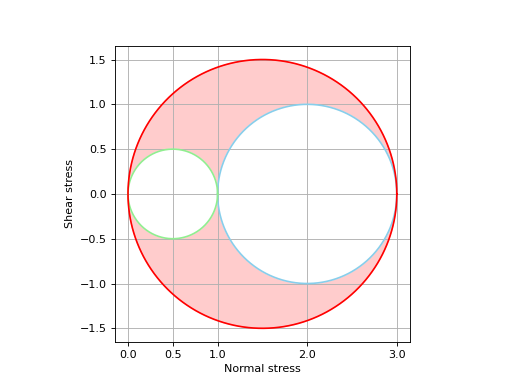
- draw_Mohr_circles()[source]
Draw the Mohr circles of the stress tensor.
This function only works for single-valued tensors.
- Returns:
fig (matplotlib.figure.Figure) – handle to Matplotlib figure
ax (matplotlib.axes.Axes) – handle to Matplotlib axes
Examples
Consider the biaxial stress-state:
from elasticipy.tensors.stress_strain import StressTensor sigma = StressTensor.tensile([1,0,0],1) + StressTensor.tensile([0,1,0],3) sigma.draw_Mohr_circles()
- eig()[source]
Compute the principal values (eigenvalues) and principal direction (eigenvectors) of the tensor, sorted in descending order of principal values
- Returns:
numpy.ndarray – Principal values
numpy.ndarray – Principal directions
See also
eigvalscompute the principal values only
- eigvals()[source]
Compute the principal values (eigenvalues), sorted in descending order.
- Returns:
Principal values
- Return type:
numpy.ndarray
See also
eigreturn the principal values and principal directions
- elastic_energy(strain, mode='pair')[source]
Compute the elastic energy.
- Parameters:
strain (StrainTensor) – Corresponding elastic strain tensor
mode (str, optional) – If ‘pair’ (default), the elastic energies are computed element-wise. Broadcasting rule applies. If ‘cross’, each cross-combination of stress and strain are considered.
- Returns:
Volumetric elastic energy
- Return type:
numpy.ndarray
- classmethod eye(shape=())[source]
Create an array of tensors populated with identity matrices
- Parameters:
shape (tuple or int, default ()) – If not provided, it just creates a single identity tensor. Otherwise, the tensor array will be of the specified shape.
- Returns:
Array of identity tensors
- Return type:
cls
- flatten()[source]
Flatten the array of tensors.
If T is of shape [s1, s2, …, sn], the shape for T.flatten() is [s1*s2*…*sn].
- Returns:
Flattened array (vector) of tensor
- Return type:
- classmethod from_Kelvin(array)[source]
Build a tensor from the Kelvin vector, or slices of Kelvin vectors
- Parameters:
array (np.ndarray or list) – Vectors, or slices of vectors, consisting in components following the Kelvin convention
- Return type:
See also
from_Voigtconstruct a tensor from vector(s) following the Voigt notation
to_Kelvinconvert the tensor to vector(s) following the Kelvin convention
- classmethod from_Voigt(array, voigt_map=None)[source]
Construct a SymmetricSecondOrderTensor from a Voigt vector, or slices of Voigt vectors.
If the array is of shape (6,), a single tensor is returned. If the array is of shape (m,n,o,…,6), the tensor will be of shape (m,n,o,…).
- Parameters:
array (np.ndarray or list) – array to build the SymmetricSecondOrderTensor from. We must have array.ndim>0 and array.shape[-1]==6.
voigt_map (list or tuple, optional) – 6-lenght list of factors to use for mapping. If None (default), the default Voigt map of the constructor is used.
- Return type:
See also
from_KelvinConstruct a tensor from vector(s) following the Kelvin notation
Examples
>>> from elasticipy.tensors.second_order import SymmetricSecondOrderTensor
>>> SymmetricSecondOrderTensor.from_Voigt([11, 22, 33, 23, 13, 12])
Symmetric second-order tensor
[[11. 12. 13.]
 [12. 22. 23.]
 [13. 23. 33.]]
- hydrostatic_pressure()[source]
Hydrostatic pressure
- Return type:
np.ndarray or float
See also
sphericalPartspherical part of the stress
- classmethod load_from_npy(file, **kwargs)[source]
Load a tensor array for .npy file.
This function uses numpy.load()
- Parameters:
file (file, str or pathlib.Path) – File to read to create the array
kwargs (dict) – Keyword arguments passed to numpy.load()
- Returns:
Tensor array
- Return type:
See also
savesave the tensor array as a numpy file
- classmethod load_from_txt(file, name_prefix='S', **kwargs)[source]
Load a tensor array from text file.
- Parameters:
file (str or file) – Textfile to read the components from.
name_prefix (str, optional) – Prefix to add to each column when parsing the file. For instance, with name_prefix=’E’, the function will look for columns names E11, E12, E13 etc.
- Returns:
Flat (1D) tensor constructed from the values given in the text file
- Return type:
- matmul(other)[source]
Perform matrix-like product between tensor arrays. Each “product” is a matrix product between the tensor components.
If A.shape=(a1, a2, …, an) and B.shape=(b1, b2, …, bn), with C=A.matmul(B), we have:
C.shape = (a1, a2, ..., an, b1, b2, ..., bn)
and:
C[i,j,k,...,p,q,r...] = np.matmul(A[i,j,k,...], B[p,q,r,...])
- Parameters:
other (SecondOrderTensor or np.ndarray or Rotation) – Tensor array or rotation to right-multiply by. If Rotation is provided, the rotations are applied on each tensor.
- Returns:
Tensor array
- Return type:
See also
__mul__Element-wise matrix product
- max(axis=None)[source]
Maximum value
- Parameters:
axis (int or None, default None) – Axis to compute maximum along with. If None, returns the overall maximum (max of flattened array)
- Returns:
Maximum value of tensors
- Return type:
- mean(axis=None)[source]
Arithmetic mean value
- Parameters:
axis (int or None, default None) – Axis to compute the mean along with. If None, returns the overall mean (mean of flattened array)
- Returns:
Mean tensor
- Return type:
- min(axis=None)[source]
Minimum value
- Parameters:
axis (int or None, default None) – Axis to compute minimum along with. If None, returns the overall minimum (min of flattened array)
- Returns:
Minimum value of tensors
- Return type:
- property ndim[source]
Return the number of dimensions of the tensor array
- Returns:
number of dimensions
- Return type:
int
See also
shapeshape of tensor array
- classmethod ones(shape=())[source]
Create an array of tensors populated with matrices of full of ones.
- Parameters:
shape (tuple or int, default ()) – If not provided, it just creates a single tensor of ones. Otherwise, the tensor array will be of the specified shape.
- Returns:
Array of ones tensors
- Return type:
cls
- principal_directions()[source]
Principal directions of the tensors
- Returns:
Principal directions of each tensor of the tensor array
- Return type:
np.ndarray
See also
eigReturn both eigenvalues and corresponding principal directions
- principal_stresses()[source]
Values of the principals stresses.
If the tensor array is of shape [m,n,…], the results will be of shape [m,n,…,3].
- Returns:
Principal stresses
- Return type:
np.ndarray
- classmethod rand(shape=None, seed=None)[source]
Generate a tensor array, populated with random uniform values in [0,1).
- Parameters:
shape (int or tuple, optional) – Shape of the tensor array. If not provided, a single tensor is returned
seed (int, optional) – Sets the seed for random generation. Useful to ensure reproducibility
- Returns:
Tensor or tensor array of uniform random value
- Return type:
cls
See also
randnGenerate a random sample of tensors whose components follows a normal distribution
Examples
Generate a single random tensor:
>>> from elasticipy.tensors.second_order import SecondOrderTensor as tensor
>>> tensor.rand(seed=123)
Second-order tensor
[[0.68235186 0.05382102 0.22035987]
 [0.18437181 0.1759059  0.81209451]
 [0.923345   0.2765744  0.81975456]]
Now try with tensor array: >>> t = tensor.rand(shape=(100,50)) >>> t.shape (100,50)
- classmethod randn(mean=array([[0., 0., 0.], [0., 0., 0.], [0., 0., 0.]]), std=array([[1., 1., 1.], [1., 1., 1.], [1., 1., 1.]]), shape=None, seed=None)[source]
Generate a tensor array, populated with components follow a normal distribution.
- Parameters:
mean (list of numpy.ndarray, optional) – (3,3) matrix providing the mean values of the components.
std (list of numpy.ndarray, optional) – (3,3) matrix providing the standard deviations of the components.
shape (tuple, optional) – Shape of the tensor array
seed (int, optional) – Sets the seed for random generation. Useful to ensure reproducibility
- Returns:
Tensor or tensor array of normal random value
- Return type:
cls
- reshape(shape, **kwargs)[source]
Reshape the array of tensors
- Parameters:
shape (tuple) – New shape of the array
kwargs (dict) – Keyword arguments passed to numpy.reshape()
- Returns:
Reshaped array
- Return type:
See also
flattenflatten an array to 1D
- rotate(rotation, mode='pair')[source]
Apply rotation(s) to the tensor(s).
The rotations can be applied element-wise, or on each cross-combination (see below).
- Parameters:
rotation (scipy.spatial.Rotation or orix.quaternion.Rotation)
mode (str, optional) – If ‘pair’, the rotations are applied element wise. Broadcasting rule applies. If ‘cross’, all the possible combinations are considered. If
C=A.rotate(rot), thenC.shape==A.shape + rot.shape.
- Return type:
- save(file, **kwargs)[source]
Save the tensor array as binary file (.npy format).
This function uses numpy.save function.
- Parameters:
file (file, str or pathlib.Path) – File or filename to which the tensor is saved.
kwargs (dict) – Keyword arguments passed to numpy.save()
See also
load_from_npyload a tensor array from a numpy file
- save_as_txt(file, name_prefix='S', **kwargs)[source]
Save the tensor array to human-readable text file.
The array must be 1D. The i-th row of the file will provide the components of the i-th tensor in of the array. This function uses pandas.DataFrame.to_csv().
- Parameters:
file (file or str) – File to dump tensor components to.
name_prefix (str, optional) – Prefix to add for naming the columns. For instance, name_prefix=’E’ will result in columns named E11, E12, E13 etc.
kwargs (dict) – Keyword arguments passed to pandas.DataFrame.to_csv()
See also
load_from_txtload a tensor array from a text file
Examples
Let’s start with a random tensor:
>>> from elasticipy.tensors.second_order import SecondOrderTensor
>>> t = SecondOrderTensor.rand(seed=123) # Use seed to ensure reproducibility
>>> t
Second-order tensor
[[0.68235186 0.05382102 0.22035987]
 [0.18437181 0.1759059  0.81209451]
 [0.923345   0.2765744  0.81975456]]
Then, this tensor can be saved to a text file:
>>> t.save_as_txt('random_tensor.txt')
The content of this file will look like this:
11,12,13,21,22,23,31,32,33
0.6823518632481435,0.053821018802222675,0.22035987277261138,0.1843718106986697,0.17590590108503035,0.8120945066557737,0.9233449980270564,0.27657439779710624,0.8197545615930021
Later, this file can be read with
load_from_txt:>>> t2 = SecondOrderTensor.load_from_txt('random_tensor.txt') >>> t2 Second-order tensor Shape=(1,)
One can note that the returned object is an array here (although
twas a single tensor). This is because the functions above are mainly meant to deal with tensor arrays. Still, we have:>>> t2[0] Second-order tensor [[0.68235186 0.05382102 0.22035987] [0.18437181 0.1759059 0.81209451] [0.923345 0.2765744 0.81975456]]
Now, let’s consider a random tensor array:
>>> t = SecondOrderTensor.rand(shape=(100,), seed=123)
Have a look on its first value:
>>> t[0] Second-order tensor [[0.68235186 0.05382102 0.22035987] [0.18437181 0.1759059 0.81209451] [0.923345 0.2765744 0.81975456]]
Now save the array:
>>> t.save_as_txt('random_tensor_array.txt')
and try to reload it:
>>> t2 = SecondOrderTensor.load_from_txt('random_tensor_array.txt')
One can check that the original shape has bee retreived:
>>> t2.shape (100,)
And that its value are almost the same of the original one (because of round off errors), e.g.:
>>> t2[0]
Second-order tensor
[[0.68235186 0.05382102 0.22035987]
 [0.18437181 0.1759059  0.81209451]
 [0.923345   0.2765744  0.81975456]]
By default, the columns in the text file are named 11, 12, etc. These names can be appended with a prefix:
>>> t.save_as_txt('random_tensor_array_with_prefix.txt', name_prefix='E')
In this case, the resulting text file will look like this:
E11,E12,E13,E21,E22,E23,E31,E32,E33
0.6823518632481435,0.053821018802222675,0.22035987277261138,0.1843718106986697,0.17590590108503035,0.8120945066557737,0.9233449980270564,0.27657439779710624,0.8197545615930021
0.8898926931111859,0.5129704552295319,0.24496460106879647,0.8242415960974113,0.21376296337509548,0.7414670522347097,0.6299402045896808,0.927407258525167,0.23190818860641882
0.7991251286200829,0.5181650368527142,0.23155562481706748,0.16590399324074456,0.49778896849779386,0.5827246406153199,0.18433798742847973,0.014894916760232246,0.47113322889046083
[...]
And it can still be parsed to rebuild the tensor:
>>> t3 = SecondOrderTensor.load_from_txt('random_tensor_array_with_prefix.txt', name_prefix='E')
One can check that all the values of
t2andt3are the same:>>> import numpy as np >>> np.all(t3 == t2) np.True_
- property shape[source]
Return the shape of the tensor array
- Returns:
Shape of array
- Return type:
tuple
See also
ndimnumber of dimensions
- classmethod shear(u, v, magnitude)[source]
Create an array of tensors corresponding to shear state along two orthogonal directions.
- Parameters:
u (np.ndarray or list) – First direction. Must be a 3D vector.
v (np.ndarray or list) – Second direction. Must be a 3D vector.
magnitude (float or np.ndarray or list) – Magnitude of the shear state to consider. If a list or an array is provided, the shape of the tensor array will be of the same shape as magnitude.
- Returns:
tensor or tensor array
- Return type:
cls
- spherical_part()[source]
Spherical (hydrostatic) part of the tensor
- Returns:
Spherical part
- Return type:
self
See also
I1compute the first invariant of the tensor
deviatoricPartdeviatoric the part of the tensor
- classmethod stack(arrays, axis=0)[source]
Stack tensor arrays along the specified axis.
- Parameters:
arrays (list of SecondOrderTensor or tuple of SecondOrderTensor) – List of tensor to stack together
axis (int, optional) – Axis along which to stack
- Returns:
Stacked tensor array
- Return type:
Examples
>>> from elasticipy.tensors.second_order import SecondOrderTensor
>>> import numpy as np
>>> a = SecondOrderTensor.rand(shape=3)
>>> b = SecondOrderTensor.rand(shape=3)
>>> c = SecondOrderTensor.stack((a, b))
>>> c.shape
(2, 3)
>>> np.all(c[0] == a)
np.True_
>>> np.all(c[1] == b)
np.True_
>>> a = SecondOrderTensor.rand(shape=(3, 4))
>>> b = SecondOrderTensor.rand(shape=(3, 4))
>>> c = SecondOrderTensor.stack((a, b), axis=1)
>>> c.shape
(3, 2, 4)
>>> np.all(c[:,0,:] == a)
np.True_
>>> np.all(c[:,1,:] == b)
np.True_
- std(axis=None)[source]
Standard deviation
- Parameters:
axis (int or None, default None) – Axis to compute standard deviation along with. If None, returns the overall standard deviation (std of flattened array)
- Returns:
Tensor of standard deviation
- Return type:
- symmetric_part()[source]
Symmetric part of the tensor
- Returns:
Symmetric tensor
- Return type:
See also
skewPartSkew-symmetric part of the tensor
- classmethod tensile(u, magnitude)[source]
Create an array of tensors corresponding to tensile state along a given direction.
- Parameters:
u (np.ndarray or list) – Tensile direction. Must be a 3D vector.
magnitude (float or np.ndarray or list) – Magnitude of the tensile state to consider. If a list or an array is provided, the shape of the tensor array will be of the same shape as magnitude.
- Returns:
tensor or tensor array
- Return type:
cls
- to_Kelvin()[source]
Convert the tensor to vector, or slices of vector, following the Kelvin(-Mandel) convention.
- Return type:
numpy.ndarray
See also
from_KelvinConstruct a tensor from vector(s) following the Kelvin convention
to_VoigtConvert the tensor to vector(s) following the Voigt convention
- to_Voigt()[source]
Convert the tensor to vector, or slices of vector, following the Voigt convention.
If the tensor array has shape (m,n,…), the result will be of shape (m,n,…,6).
- Returns:
Voigt vector summarizing the components
- Return type:
numpy.ndarray
- to_pymatgen()[source]
Convert the second order object into an object compatible with pymatgen.
The object to use must be either a single tensor, or a flat tensor array. In the latter case, the output will be a list of pymatgen’s tensors.
- Returns:
- The type of output depends on the type of object to use:
if the object is of class StrainTensor, the output will be of class pymatgen.analysis.elasticity.Strain
if the object is of class StressTensor, the output will be of class pymatgen.analysis.elasticity.Stress
otherwise, the output will be of class pymatgen.core.tensors.Tensor
- Return type:
pymatgen.analysis.elasticity.Strain, pymatgen.analysis.elasticity.Stress, pymatgen.core.tensors.Tensor or list
See also
flattenConverts a tensor array to 1D tensor array
- trace()[source]
Return the traces of the tensor array
- Returns:
traces of each tensor of the tensor array
- Return type:
np.ndarray or float
- transpose_array()[source]
Transpose the array of tensors
If A is a tensor array of shape [s1, s2, …, sn], A.T is of shape [sn, …, s2, s1].
- Returns:
Transposed array
- Return type:
See also
Ttranspose the tensor array (not the components)
- transpose_tensor()[source]
Transpose of tensors of the tensor array
- Returns:
Array of transposed tensors of the tensor array
- Return type:
See also
transpose_arraytranspose the array (not the components)
- triaxiality()[source]
Compute the stress triaxiality.
It is defined as the hydrostatic stress to the von Mises equivalent stress ratio (see Notes).
- Returns:
Stress triaxiality. A float is returned if the tensor is single-valued, otherwise, an array of the same shape of the tensor is returned.
- Return type:
float or np.ndarray
See also
hydrostatic_pressurecompute the hydrostatic pressure
vonMisescompute the von Mises equivalent stress
Lode_anglecompute the Lode angle
Notes
The stress triaxiality is defined as follows:
\[\eta = \frac{-p}{\sigma_{vM}}\]where \(p\) and \(\sigma_{vM}\) are the hydrostatic pressure and the von Mises equivalent stress, respectively.
Examples
One can check that the stress triaxiality is for simple tensile is 1/3:
>>> from elasticipy.tensors.stress_strain import StressTensor
>>> s1 = StressTensor.tensile([1,0,0],1.)
>>> print(s1.triaxiality())
0.3333333333333333
For a stress array (e.g. for biaxial tensile stress):
>>> s2 = s1 + StressTensor.tensile([0,1,0],[0,0.5,1])
>>> s2.triaxiality()
array([0.33333333, 0.57735027, 0.66666667])
- vonMises()[source]
von Mises equivalent stress.
- Returns:
von Mises equivalent stress
- Return type:
np.ndarray or float
See also
TrescaTresca equivalent stress
Examples
For (single-valued) tensile stress:
>>> from elasticipy.tensors.stress_strain import StressTensor
>>> sigma = StressTensor.tensile([1,0,0],1)
>>> print(sigma.vonMises())
1.0
For (single-valued) shear stress:
>>> sigma = StressTensor.shear([1,0,0],[0,1,0],1)
>>> print(sigma.vonMises())
1.7320508075688772
For arrays of stresses :
>>> import numpy as np
>>> sigma_xx = np.linspace(0,1,5)
>>> sigma_xy = np.linspace(0,1,5)
>>> sigma = StressTensor.tensile([1,0,0],sigma_xx) + StressTensor.shear([1,0,0],[0,1,0],sigma_xy)
>>> sigma.vonMises()
array([-0. ,  0.5,  1. ,  1.5,  2. ])
- classmethod zeros(shape=())[source]
Create an array of tensors populated with matrices full of zeros.
- Parameters:
shape (tuple or int, default ()) – If not provided, it just creates a single tensor of ones. Otherwise, the tensor array will be of the specified shape.
- Returns:
Array of ones tensors
- Return type:
cls